
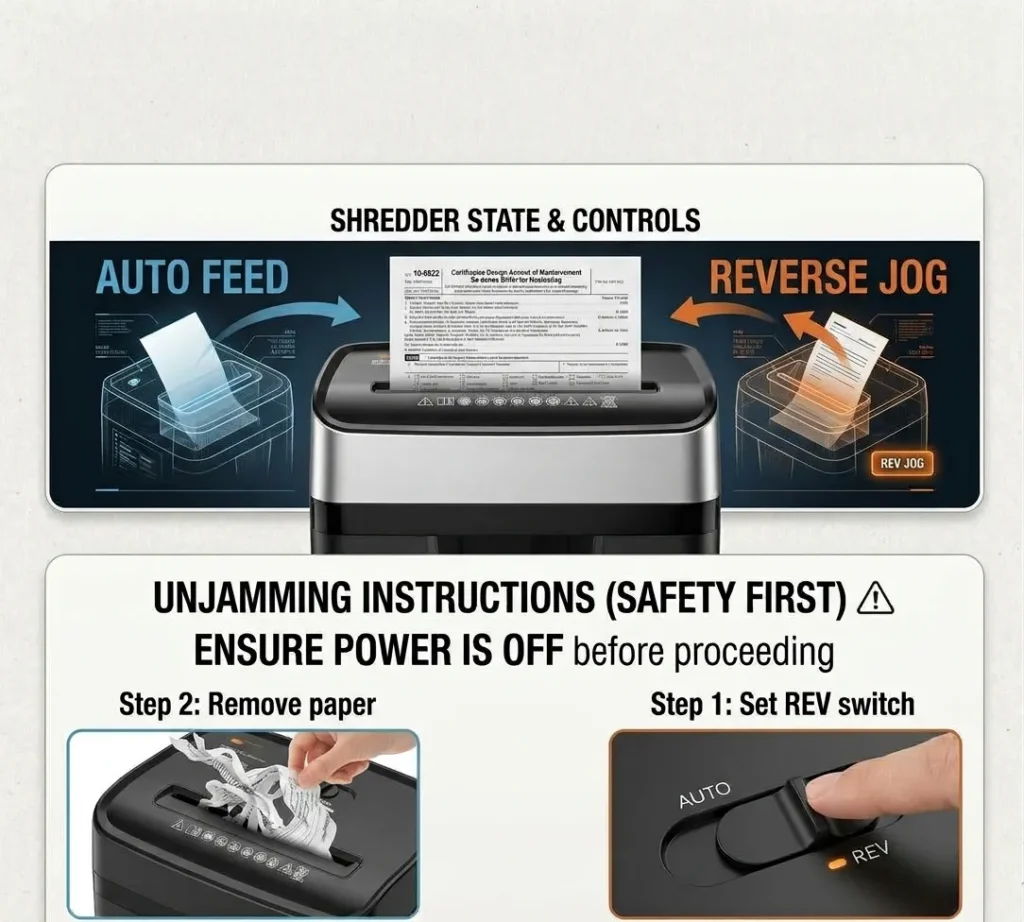
A jammed paper shredder can interrupt your work, trap confidential documents, and make a simple task frustrating. The problem often comes from too many sheets, misfed paper, a full waste bin, insufficient lubrication, or an overheated motor.
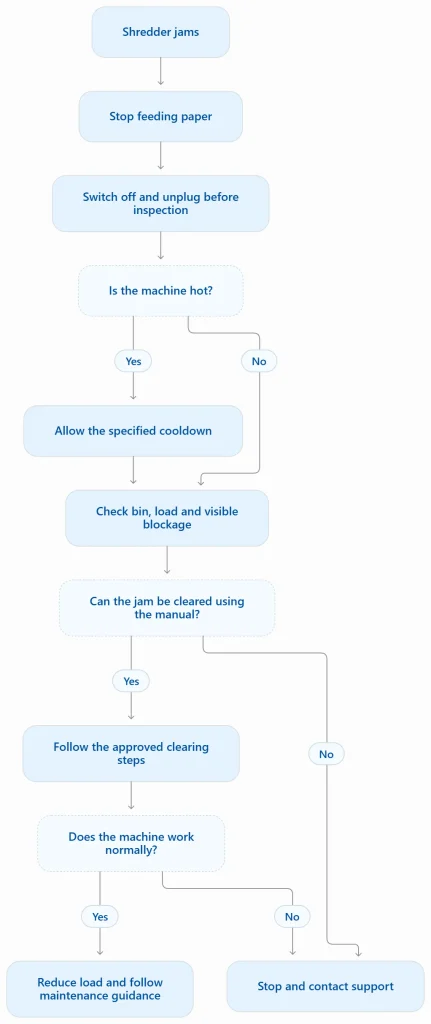
To fix a jammed paper shredder, stop feeding paper, switch off the machine, and unplug it before inspecting or removing a blockage. Check your model’s manual before using reverse mode or attempting any other clearing procedure. If the motor feels hot, let the shredder cool for the period specified by its manufacturer.
Never reach into the cutters or use tools near moving blades. The safest repair depends on what caused the jam and which clearing methods your machine supports.
What to Do First When Your Paper Shredder Jams
Before attempting a paper shredder jam fix, determine whether paper is physically stuck or the machine has stopped for another reason.
Follow these initial checks:
- Stop feeding paper. Do not push additional sheets into the opening or force the motor to keep running.
- Switch off and unplug the shredder. Disconnect the power before inspecting the machine, removing debris, or using an approved cleaning tool.
- Check for overheating. If the shredder stopped after extended use or shows an overheat indicator, let it cool for the manufacturer’s specified period.
- Check the waste bin. Empty an overfilled bin and confirm that the shredder head and basket sit correctly together.
- Read the manual. Find the instructions for reverse operation, jam clearing, approved materials, and lubrication.
A thermal shutdown can resemble a jam, but cooling the motor will not remove paper trapped between the cutters. A full bin or improperly seated shredder head can prevent operation without a physical blockage.
If you smell burning, see smoke, notice damaged wiring, or hear an unusual grinding noise, stop using the machine and seek manufacturer support. Do not keep restarting it to see whether the problem disappears.
Quick Diagnostic Table: What Does the Symptom Mean?
| Symptom | Possible explanation | Recommended next step |
|---|---|---|
| Paper is stuck in the feed | Overload or misfeed | Follow the model’s approved clearing procedure. |
| Reverse works, but forward does not | Remaining blockage or mechanical or sensor fault | Stop if the normal clearing procedure fails. |
| Machine stops after extended use | Thermal protection may have activated | Allow the specified cooldown period. |
| Motor runs, but paper will not feed | Misfeed, sensor issue, or mechanical fault | Check the manual and inspect only when unplugged. |
| Grinding or unusual mechanical noise | Obstruction or damaged component | Stop operation and contact support. |
| Jams return after every batch | Excessive load, maintenance issue, or mechanical wear | Review feeding habits and maintenance requirements. |
These symptoms can have several causes. The table helps narrow down the problem, but it cannot diagnose every shredder model.
How to Fix a Jammed Paper Shredder Step by Step
Follow these steps in order. Stop whenever the manufacturer’s instructions differ or the blockage cannot be cleared safely.
1. Stop Feeding Paper and Check the Load
Remove any loose sheets from the surrounding area. Check how many sheets entered the shredder and whether they were folded, crumpled, or fed unevenly.
A folded sheet can count as multiple layers of paper. If the machine has a rated sheet capacity, stay within that limit rather than assuming it can handle a thick stack.
Do not pull trapped paper from the feed opening while the machine remains powered. Move to the next step only after isolating the power.
2. Empty the Bin and Check the Setup
A full waste bin can prevent shredded material from falling away from the cutters. Compressed waste may also interfere with the cutting area.
With the shredder unplugged, empty the bin and check for visible debris around accessible areas. Refit the shredder head or basket according to the manual, since some models use a safety interlock that prevents operation when the components are incorrectly seated.
Do not open the cutting head or bypass a safety switch to make the machine run.
3. Use Reverse Mode If the Manual Permits It
Once the initial inspection is complete, reconnect the shredder only when it is safe to do so and no hands or tools are near the feed opening.
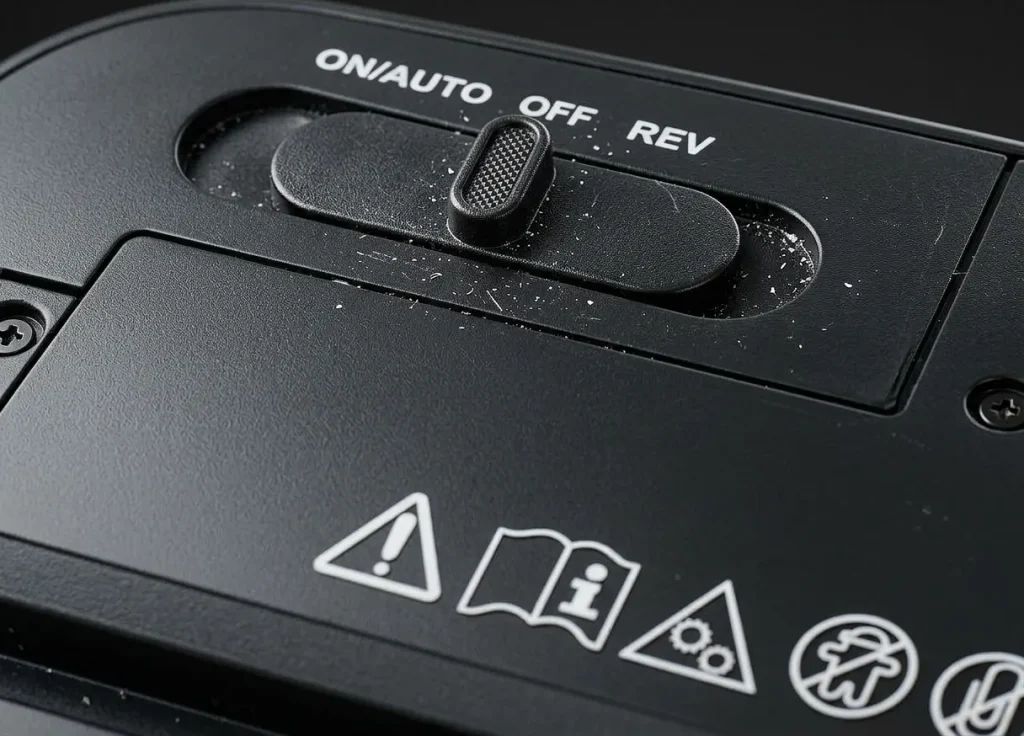
Use the reverse control according to the manufacturer’s instructions. Some models use a switch marked “Reverse” or “R”; others use a button or electronic control. Reverse operation may release paper by moving it away from the cutters.
Keep your hands, clothing, and tools clear of the feed opening. Never assume that a reverse command has removed every piece of trapped paper.
4. Try Brief Forward and Reverse Operation Only If Approved
If reverse mode fails, check whether your manual recommends alternating forward and reverse operation. Some manufacturers describe short cycles for basic paper jams.
Follow the exact procedure for your model. Do not repeatedly switch directions if the motor strains, the cutters remain blocked, or the machine makes unusual noises.
If the manufacturer does not recommend alternating modes, do not improvise. Repeatedly forcing a motor against a blockage can worsen the problem.
5. Remove Accessible Paper With the Power Disconnected
If the approved powered clearing procedure does not work, switch off and unplug the shredder again before any manual inspection.
Remove only loose, accessible paper using a method explicitly permitted by the manual. Do not put fingers into the cutting mechanism, reach underneath exposed cutters, or insert knives, screwdrivers, or other improvised tools.
If paper remains tightly trapped between the blades, stop and contact the manufacturer or a qualified repair service. Some blockages require work beyond routine user maintenance.
6. Lubricate Only When Appropriate
Insufficient lubrication can contribute to poor cutting performance, but oil is not a universal solution for a physical jam.
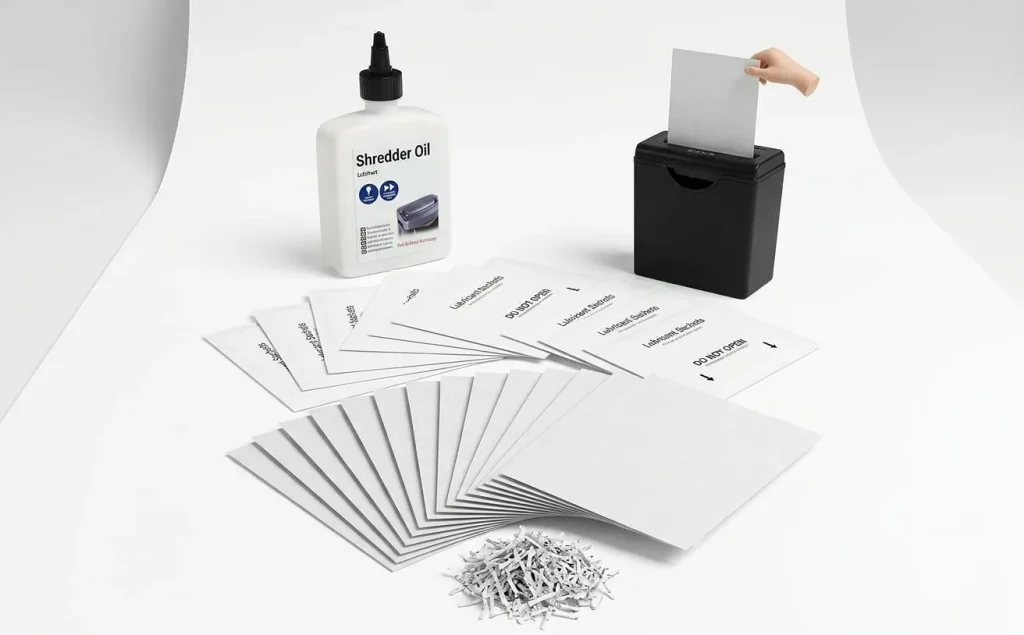
Check whether your model requires dedicated shredder oil or compatible lubricant sheets. Follow the manufacturer’s instructions for the product, application method, and maintenance schedule.
For detailed guidance, see Our guide to maintaining the cutters with suitable shredder oil covers lubrication practices. Lubrication may help with maintenance-related problems, but it will not repair damaged cutters or a failed motor.
Stop troubleshooting if the machine still cannot clear the blockage, repeatedly trips its protection system, or shows signs of damage.
Why Your Paper Shredder Is Jammed
A successful fix starts with the likely cause. A shredder that stops feeding paper needs a different response from one that shuts down because its motor is hot.
Too Many Sheets or Folded Paper
Overloading makes it harder for the cutters to process paper. Folded sheets, thick envelopes, and crumpled pages can increase the load beyond the machine’s capacity.
Fix: Remove excess loose paper, then follow the approved clearing procedure. Feed smaller, straight stacks after the blockage clears. Fellowes explains common paper-jam causes.
Paper Fed Too Quickly or Unevenly
Feeding another stack before the previous one clears can create a blockage. Paper entering at an angle can cause a similar problem.
Fix: Feed paper straight and wait for each batch to clear. Follow the manual’s instructions for staples, paper clips, cards, and other materials.
Full Bin or Blocked Exit
Shredded paper needs room to fall away from the cutting mechanism. A packed bin can obstruct that process.
Fix: Empty the bin, remove accessible loose debris with the machine unplugged, and reseat the basket or shredder head correctly.
Insufficient Lubrication or Paper Dust
Some cross-cut and micro-cut shredders require regular lubrication. Dry cutters and accumulated paper dust can affect performance, but neither automatically proves that lubrication will clear a physical jam.
Fix: Follow the manufacturer’s lubrication and cleaning schedule. Use our guide to proper shredder oiling for the full procedure.
Overheating and Thermal Shutdown
Every shredder has an operating limit. Running beyond its rated duty cycle can trigger thermal protection, which stops the motor until it cools.
Fix: Switch off the machine and allow the specified cooldown period. If the shredder stops during use and feels hot, allow it to cool for the period specified in its manual before attempting another cycle. For repeated shutdowns or overheating symptoms, read our guide to shredder overheating and cooldown problems to investigate the issue separately from a paper blockage.
Foreign Material or a Mechanical Fault
Unsupported materials, damaged cutters, or a failed feed mechanism can cause persistent problems.
Fix: Stop if you suspect mechanical damage. Do not dismantle the cutting head or attempt electrical repairs unless the manufacturer specifically authorizes the work.
If the same problem returns after you clear the blockage, look beyond the immediate jam and identify the repeated trigger. Our guide to why a shredder repeatedly jams covers recurring patterns and the habits or conditions that may cause them.
What to Do When Reverse Mode Doesn’t Work
Reverse mode can release trapped paper, but it cannot repair every fault. Use the symptom below to decide when to stop.
The Shredder Runs in Reverse but Won’t Shred Forward
The machine may still have a blockage, or it may have a problem with its forward-feed mechanism or sensor.
Unplug it before checking accessible areas. If the approved clearing steps do not restore normal operation, contact manufacturer support rather than repeatedly cycling the controls.
The Shredder Hums but the Cutters Don’t Move
A humming sound without normal cutting can indicate a stubborn obstruction, a motor struggling under load, or a mechanical fault. The sound alone cannot identify which problem is present.
Switch off and unplug the shredder. Do not keep trying to power through the blockage. If the cutters remain stuck after the manual’s approved procedure, seek qualified service.
The Shredder Won’t Start or Keeps Stopping
Check the power supply, bin position, safety interlock, indicators, and control settings as described in the manual. Some models stop when the bin is full or incorrectly seated; others activate a sensor or thermal protection.
Do not bypass an interlock or assume every machine has the same reset procedure.
When to Stop Troubleshooting
Stop DIY attempts if you notice:
- Burning smells, smoke, or damaged wiring.
- Grinding noises or visible cutter damage.
- A jam that remains after the approved clearing steps.
- Repeated shutdowns after the machine has cooled.
- A fault that would require opening the cutting head or repairing electrical parts.
Your manufacturer’s warranty may cover certain defects. Check its terms before attempting repairs that could affect coverage.
Which Tools Help Clear a Shredder Jam?
You usually need very little equipment. The right supply depends on the problem and the manufacturer’s instructions.
| Tool or supply | When it helps | Main limitation |
|---|---|---|
| Dedicated shredder oil | Routine lubrication when specified | Does not fix every physical blockage. |
| Lubricant sheets | Convenient maintenance for compatible models | Not a substitute for clearing trapped paper. |
| Cleaning brush | Removing accessible dust where permitted | Never use it on powered cutters. |
| Manufacturer-approved removal tool | Clearing accessible material when explicitly allowed | Not every model permits manual tool removal. |
Avoid knives, screwdrivers, and improvised tools. Never place your fingers near the cutters, even when the machine appears to be off. Unplug it before manual inspection and follow the exact safety instructions in the manual.
For compatible maintenance supplies, compare dedicated shredder oil and lubrication methods before buying. Choose a product that matches your shredder’s requirements rather than assuming every lubricant works with every machine.
How to Prevent Paper Shredder Jams
A reliable routine can reduce interruptions and help you avoid repeating the same repair.
Stay Within the Rated Sheet Capacity
Check the maximum sheet count in the manual or on the machine. Feed straight, unfolded paper in manageable batches, and allow each batch to clear before adding more.
If you regularly shred large stacks, use our paper shredder selection guide to compare capacity and workload requirements before choosing a replacement.
Follow the Duty Cycle and Cooldown Time
The duty cycle describes how long a shredder can operate before it needs a break. A machine rated for short sessions may stop if you use it continuously for a large document-clearance job.
Check the model’s rated runtime and cooldown period. Do not restart an overheated machine simply because it has been switched off for a few minutes.
Maintain the Cutters and Sensors
Use the lubricant and cleaning methods specified by the manufacturer. Empty the bin before waste becomes compacted, and clean accessible sensors only when the manual permits it.
See how to clean shredder blades safely for guidance on routine maintenance without unsafe disassembly.
Choose Anti-Jam Technology That Fits Your Workload
Anti-jam technology can help reduce overloads or respond when a blockage begins. The actual function varies by manufacturer and model.
Anti-jam technology: A group of features that detect excessive paper loads, stop feeding, or reverse paper to reduce the risk of a jam. It does not guarantee that a shredder will never jam.
For example, Fellowes describes its jam-prevention features as systems that can detect and respond to demanding paper loads. That is a manufacturer description of its products, not independent proof that all jams can be prevented.
Compare these features before purchasing:
| Feature | Potential benefit | What to check |
|---|---|---|
| Overload detection | Identifies an excessive paper load on equipped models | Whether the machine stops or reverses automatically |
| Auto-reverse | Can move paper away from the cutters | Whether it activates automatically or requires a button |
| Capacity indicator | Helps prevent overfeeding | Whether the indicator is available on the specific model |
| Longer duty cycle | Supports longer shredding sessions | Rated runtime, cooldown, and intended workload |
A higher sheet capacity or anti-jam feature will not compensate for ignoring the manual or feeding prohibited materials. If jams happen repeatedly, read why your shredder keeps jamming to investigate the recurring cause.
When Should You Repair or Replace a Jammed Shredder?
One jam does not mean you need a new machine. Start with the basic checks and approved maintenance steps before spending money on replacement equipment.
Consider repair or replacement if:
- Jams keep returning: The machine blocks repeatedly despite correct feeding and maintenance.
- The cutters or motor appear damaged: Persistent grinding, unusual smells, or failed operation can indicate a mechanical fault.
- Repair costs are high: Compare the repair estimate with the cost of a suitable replacement.
- The machine no longer fits your workload: A shredder with a short duty cycle may struggle with the volume of documents you need to destroy.
- Warranty support is available: Check the warranty and authorized service options before paying for repairs.
Practical Example: A Home Office Shredder That Keeps Stopping
Consider a hypothetical home office user who feeds a thick stack of folded paperwork into a small shredder. The machine stops, and reverse mode fails to clear the paper.
The correct response is not to buy a more expensive shredder immediately. The user should disconnect the power, follow the model’s clearing instructions, check the bin, and review the rated sheet capacity. If the machine works normally afterward, better feeding habits may solve the problem.
If the cutters remain blocked or the motor makes abnormal noises, the user should stop and seek service. This is an illustrative scenario, not a documented repair case or a claim that ShredPro Ink has tested a particular machine.
For equipment that genuinely needs replacement, compare the available models against your workload, runtime, capacity, warranty, and jam-prevention features. Our paper shredder buying guide explains how to match these specifications to your needs.
Frequently Asked Questions
Can I Unjam a Shredder Without Taking It Apart?
Yes, many basic jams can be cleared without dismantling the machine. Stop feeding paper, disconnect power before manual inspection, check the bin, and follow the manufacturer’s reverse-mode procedure. If the blockage remains inside the cutting mechanism, seek service rather than opening the head.
Why Is My Shredder Stuck in Reverse?
A shredder may remain in reverse because of a control-setting issue, a persistent blockage, or a fault in its feed mechanism. Check the manual for the correct operating mode and approved troubleshooting steps. If the machine will not return to normal operation, stop using it and contact the manufacturer.
Can Shredder Oil Fix a Jam?
Shredder oil can help when inadequate lubrication contributes to poor cutting performance. It will not reliably remove every physical blockage or repair damaged cutters. Use only a lubricant approved for your model and follow the manufacturer’s instructions.
How Long Should I Wait After Overheating?
Follow the cooldown period specified in your shredder’s manual. The required time varies by model and operating conditions, so there is no single waiting period that applies to every machine. If the shredder continues to stop after cooling, investigate the cause before resuming use.
Why Does My Shredder Keep Jamming?
Recurring jams can result from overfeeding, folded paper, rapid feeding, a full bin, insufficient maintenance, or mechanical wear. Reduce the load, feed paper straight, empty the bin, and follow the maintenance schedule. If the problem persists, see our guide to common causes of recurring shredder jams.
Does Anti-Jam Technology Prevent All Paper Jams?
No. Anti-jam systems can detect excessive loads, stop feeding, or reverse paper on supported models. Their capabilities vary, and they cannot guarantee protection against every blockage, incompatible material, or mechanical fault. Check the manufacturer’s documentation for the exact feature and its limitations.
Get Your Shredder Working Safely Again
A successful paper shredder jam fix starts with identifying the likely cause, isolating the power before manual inspection, and following the machine’s approved clearing procedure. Do not force the motor, reach into the cutters, or dismantle the cutting head to save a few minutes.
If your shredder works normally after clearing the blockage, review its sheet capacity, duty cycle, and maintenance schedule to reduce repeat problems. For continued trouble, use our guide to long-term shredder care to plan routine care or contact the manufacturer when a fault needs professional attention.