
Affiliate Disclosure: As an Amazon Associate, ShredPro Ink earns from qualifying purchases. If you buy through links on this page, we may earn a commission at no extra cost to you.
Buying a paper shredder sounds simple until you compare the specifications. Cross-cut, micro-cut, P-levels, sheet capacity, duty cycle, run time, bin size, noise, and auto-feed features all affect what you should buy.
The right machine depends on what you destroy, how sensitive those documents are, and how much you shred in a typical session. A home user clearing old statements has a different workload from a small business processing client records every week.
This paper shredder buying guide gives you a practical way to choose without paying for specifications you won’t use or buying a machine that struggles with your workload.
The basic decision is:
Documents → Security → Volume → Duty Cycle → Capacity → Features → Ownership Cost → Product
If you know those eight factors, you can narrow the market quickly.
Quick Answer: How to Choose a Paper Shredder
If you want the short version, use this order:
- Identify the documents. Decide whether you’re shredding ordinary household paperwork, financial records, client files, tax documents, or highly sensitive information.
- Choose the security level. Compare strip-cut, cross-cut, and micro-cut shredding, then look at the applicable DIN 66399 P-level.
- Estimate your workload. Think about how many sheets you shred in a normal session, not just the number of sheets the machine accepts at once.
- Match the duty cycle. Check how long the shredder can operate before it needs a cooldown period.
- Choose practical capacity. Look at sheet capacity, bin size, shred speed, and throat width together.
- Pay for useful features. Auto-feed, reverse, overload protection, safety sensors, casters, and quiet operation can matter, but only when they match your routine.
- Compare ownership cost. Consider maintenance, replacement bags, warranty, downtime, and how often you’ll actually use the machine.
- Choose the product category before the model. Once you know your requirements, compare specific machines.
| If you… | Prioritize… |
|---|---|
| Shred occasionally | Security + compact size |
| Shred weekly batches | Duty cycle + bin capacity |
| Work from home | Noise + run time |
| Handle sensitive records | Appropriate P-level + cut type |
| Run a small business | Capacity + duty cycle + ownership cost |
| Shred large batches | Run time + bin size + speed |
| Want hands-off shredding | Auto-feed capacity + cycle time |
| Have limited space | Footprint + bin size + adequate capacity |
Key takeaway: Don’t start with the highest sheet count or the lowest price. Start with the workload.
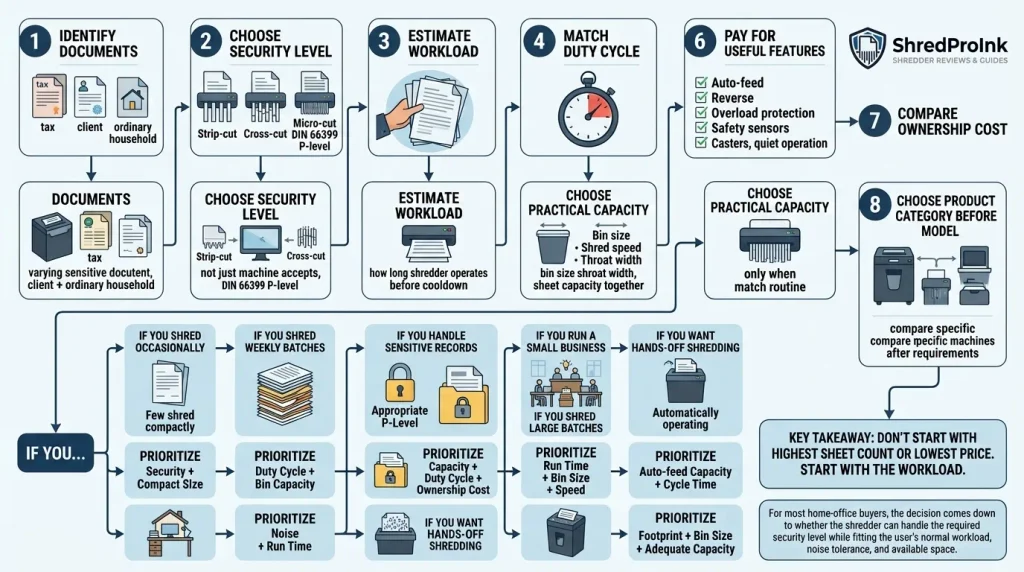
For most home-office buyers, the decision comes down to whether the shredder can handle the required security level while fitting the user’s normal workload, noise tolerance, and available space.
For a more detailed product path, see our current paper shredder recommendations.
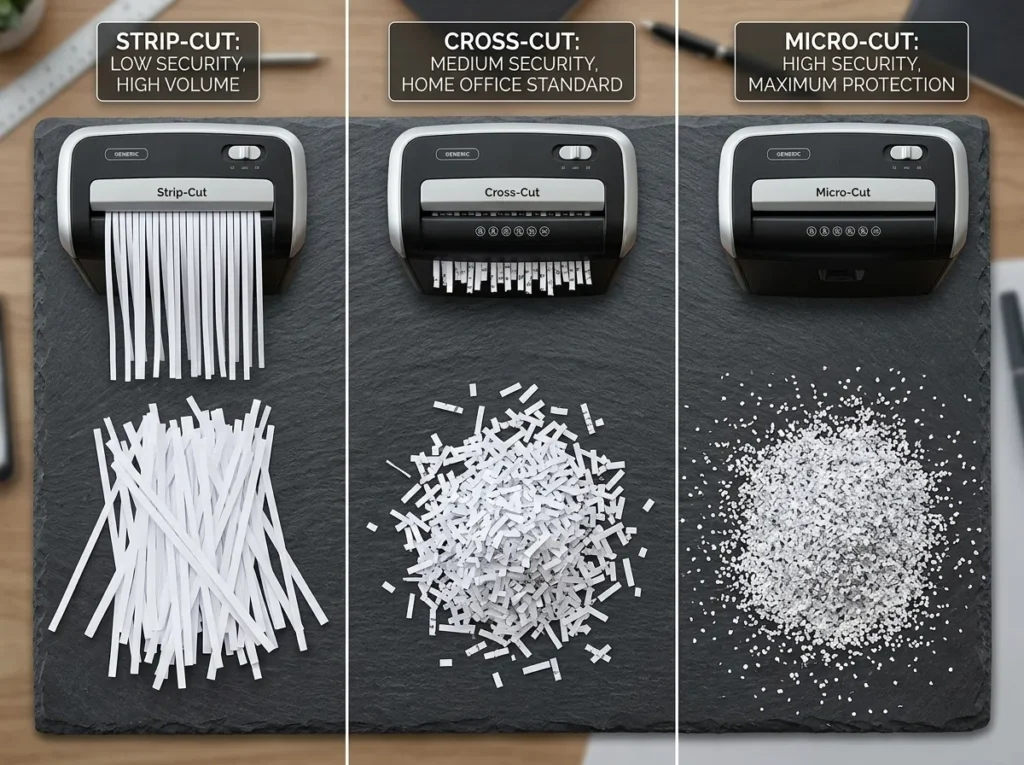
Paper Shredder Cut Types Explained
The cutting method is one of the first specifications you should compare. It affects the size of the shredded material, security level, throughput, and often the way you’ll use and maintain the machine.
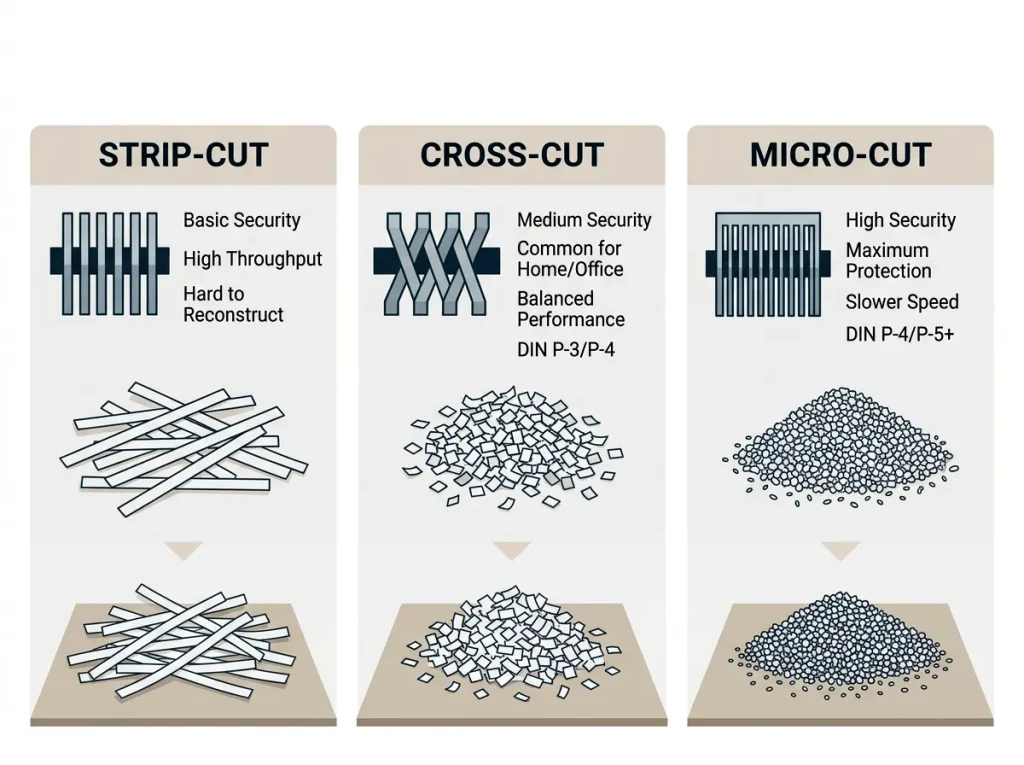
The three common categories are strip-cut, cross-cut, and micro-cut.
Strip-Cut Shredders
Strip-cut machines cut each sheet into long, narrow strips. They generally process paper in a straightforward way and can suit documents that don’t contain sensitive personal or business information.
The limitation is reconstruction. Long strips provide more material and shape for someone trying to piece a document back together than smaller particles do.
That makes strip-cut a poor starting point for many households that routinely dispose of financial records, account information, medical paperwork, or other personal data.
If your documents contain sensitive information, move up to a cross-cut or micro-cut machine rather than choosing strip-cut simply because it is inexpensive.
Cross-Cut Shredders
Cross-cut shredders cut paper in two directions, producing smaller particles than strip-cut machines.
This makes cross-cut a common middle ground for household and home-office document destruction. Many current personal shredders use cross-cut cutting systems, including models rated at P-4 under DIN 66399.
Cross-cut can make sense when you need better document security than strip-cut provides but don’t need the smallest particle size available.
It can be a sensible choice for:
- Personal paperwork with account information
- Bank and financial documents
- Household records
- Routine home-office paperwork
- Moderately sensitive business documents, when the applicable security requirements allow it
The important point is that “cross-cut” alone doesn’t tell you the complete security story. Check the actual particle size and stated P-level.
For a deeper comparison, see our cross-cut shredder guide.
Micro-Cut Shredders
Micro-cut machines reduce paper to much smaller particles than typical cross-cut machines.
That can provide a higher level of document destruction, but smaller particles often come with trade-offs in processing speed, sheet capacity, or workload depending on the model.
Micro-cut is worth considering when the documents deserve stronger protection and you are comfortable trading some convenience or throughput for smaller particles.
Common examples include:
- Sensitive financial records
- Confidential business information
- Client records
- Documents containing account numbers
- Higher-security document destruction
Do not assume that every product marketed as “micro-cut” has the same security level. Check the manufacturer’s stated cut size and DIN rating.
See our micro-cut shredder guide for the deeper product and security discussion.
Cross-Cut vs. Micro-Cut: Which Should You Choose?
The decision isn’t simply “micro-cut is better.”
Micro-cut produces smaller particles, but you still need to consider workload, duty cycle, sheet capacity, bin size, noise, and price.
| Factor | Cross-Cut | Micro-Cut |
|---|---|---|
| Particle size | Smaller than strip-cut | Smaller than typical cross-cut |
| Security potential | Moderate to high | High |
| Typical use | Home, home office, general sensitive paperwork | More sensitive records |
| Throughput | Often practical for regular workloads | Can involve more processing trade-offs |
| Waste volume | Higher than micro-cut | Lower for the same paper volume |
| Maintenance | Model dependent | Model dependent |
| Cost | Often lower | Often higher |
For the full three-way comparison, see how strip-cut, cross-cut, and micro-cut shredders differ.
Understanding DIN 66399 and P-Level Security
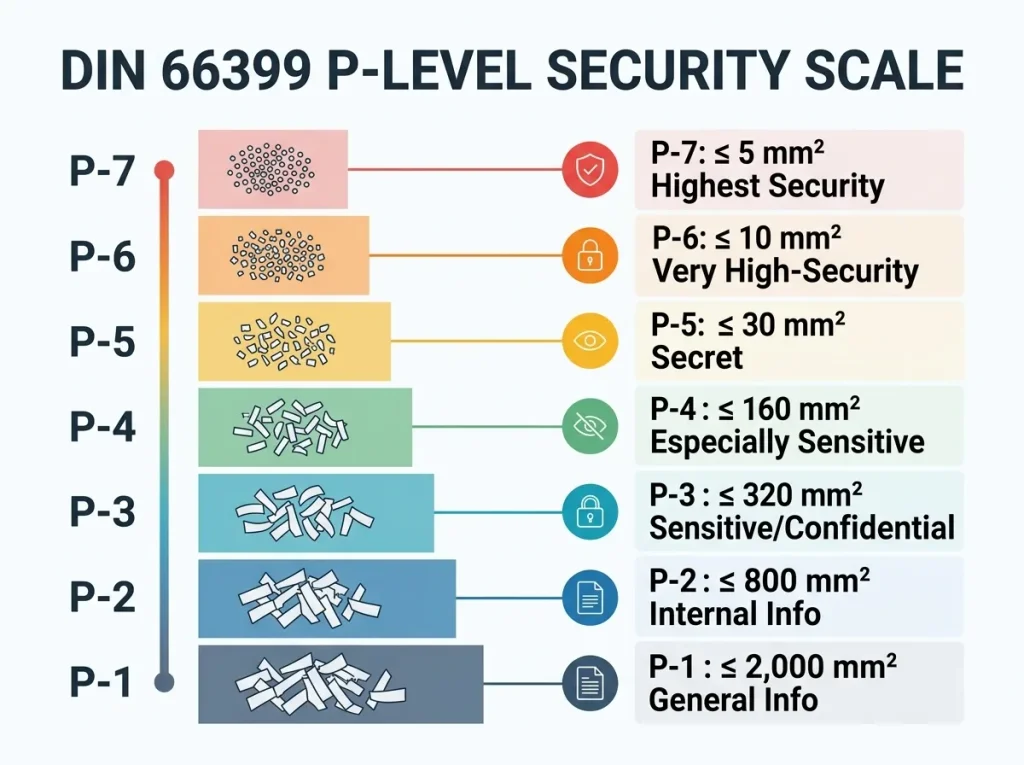
DIN 66399 is a German standard for secure destruction of data carriers, including paper. For paper, the relevant security levels are P-1 through P-7.
The levels become more demanding as the permitted particle size gets smaller. DIN 66399 also distinguishes different material categories, so you should not treat a P-level as a universal rating for every type of data carrier.
What Is DIN 66399?
DIN 66399 replaced the older DIN 32757 framework and expanded the system to seven security levels.
For paper, the P designation identifies the paper category. The security number indicates the destruction level.
At a high level:
Higher P-number → smaller permitted particles → greater destruction requirement
That doesn’t mean every buyer needs the highest available level.
The correct level depends on the sensitivity of the information and any requirements that apply to your organization.
P-1 Through P-7 Explained
The permitted particle sizes become progressively smaller from P-1 through P-7. For paper, published DIN 66399 guidance places the maximum particle surface area at 2,000 mm² for P-1, 800 mm² for P-2, 320 mm² for P-3, 160 mm² for P-4, 30 mm² for P-5, 10 mm² for P-6, and 5 mm² for P-7.
| P-Level | Maximum particle surface area for paper | General context |
|---|---|---|
| P-1 | ≤ 2,000 mm² | General information |
| P-2 | ≤ 800 mm² | Internal information |
| P-3 | ≤ 320 mm² | Sensitive or confidential information |
| P-4 | ≤ 160 mm² | Especially sensitive information |
| P-5 | ≤ 30 mm² | Secret information |
| P-6 | ≤ 10 mm² | Very high-security information |
| P-7 | ≤ 5 mm² | Highest paper-security level |
These are maximum particle-size requirements, not a promise that every shredder with a particular marketing label will perform identically under every condition.
For the complete security-level explanation, see our DIN 66399 and P-level guide.
What P-Level Is Suitable for Home Documents?
There isn’t one P-level that every household must use.
A homeowner disposing of ordinary paperwork has a different security requirement from someone destroying financial records, sensitive client information, or highly confidential business material.
For personal and home-office buying, look at:
- What information appears on the documents
- Whether the documents contain account or identification numbers
- How sensitive the information would be if reconstructed
- Whether a business or regulatory requirement applies
- How much paper you need to destroy
Don’t choose a P-level solely because the number is higher.
A higher security level can be useful, but it can also change the balance between particle size, throughput, price, and workload.
When Does a Business Need More Security?
A business should base its shredder choice on the sensitivity of its records and the requirements that apply to its operations.
Client records, financial documents, employee information, medical information, legal files, and strategic business records can require more careful handling than ordinary internal paperwork.
For regulated information, don’t treat a shredder’s P-level as automatic proof of regulatory compliance.
If you’re dealing with healthcare or privacy requirements, see our HIPAA and GDPR document-destruction guide and verify the requirements that apply to your organization with the appropriate compliance professional.
Why P-Level Shouldn’t Be Your Only Buying Criterion
Security is only one part of the buying decision.
A P-5 shredder that cannot handle your workload can create a frustrating workflow. A machine with excellent particle size but a short operating cycle may force you to divide a large document purge into many small sessions.
The better question is:
Does this machine provide the required destruction level while handling your actual workload?
That’s why security comes before workload, but doesn’t end the decision.
The Paper Shredder Specifications That Actually Matter
Once you’ve established the security requirement, move to the specifications that determine whether the machine will work well in your routine.
Don’t compare these numbers independently. A shredder is a system.
Sheet Capacity
Sheet capacity tells you how many sheets the manufacturer says the machine can accept in one pass.
For example, a manufacturer may rate a machine for 10 or 12 sheets of paper under specified conditions.
That number is useful, but it doesn’t tell you how quickly the machine will clear a large pile.
Paper weight, operating conditions, and the machine’s design can affect real-world performance. Fellowes, for example, publishes sheet capacity using specified paper conditions, and its product information shows that different models combine sheet capacity with very different duty cycles.
Think of sheet capacity as per-pass capacity, not total workload capacity.
Duty Cycle and Continuous Run Time
Duty cycle tells you how long the shredder can operate before it needs to stop or cool down.
This is one of the most overlooked specifications.
A machine rated for 12 sheets per pass may still be a poor choice for a 500-page purge if its operating cycle is short.
Fellowes’ current product range illustrates the difference clearly. Its home-office models include machines with duty cycles ranging from about 5 minutes to 20 minutes, while its LX office models offer cycles such as 10, 20, and 30 minutes depending on the model.
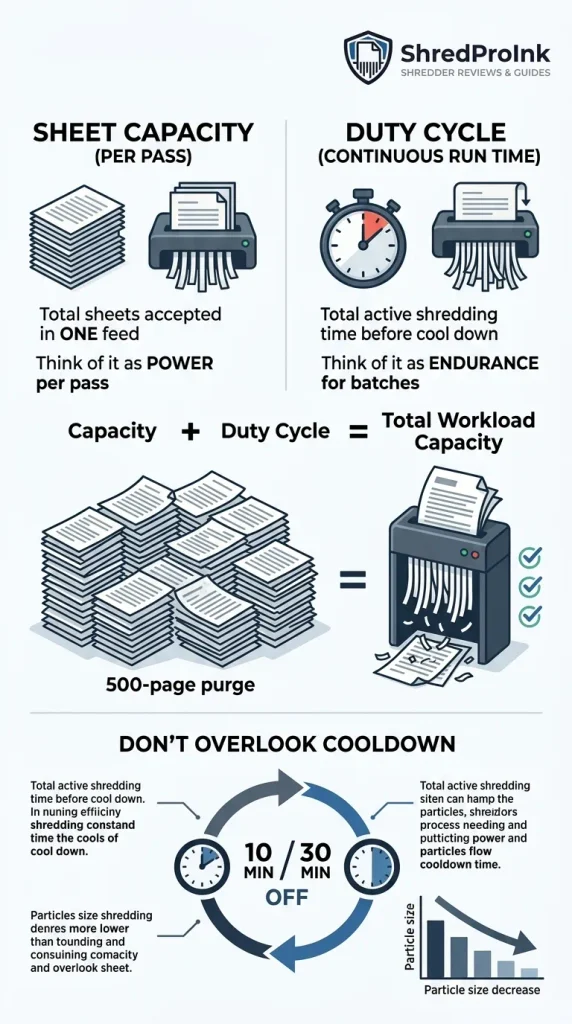
Sheet capacity tells you how much you can feed at once. Duty cycle tells you how long you can keep going.
For a weekly or seasonal batch workload, duty cycle may matter more than adding a few sheets to the per-pass rating.
Cooldown Time
A shredder may advertise a run time such as “10 minutes on / 30 minutes off.”
That second number matters.
If you plan to shred for an hour, a machine that repeatedly requires long cooldown periods could turn a one-hour job into a much longer task.
Always look for both parts of the cycle:
Run time + required cooldown
Don’t evaluate run time in isolation.
Bin Size
The bin catches everything your machine destroys.
A small bin can work well for occasional shredding, especially when the machine needs to stay compact. A larger bin becomes more useful when you process larger batches or use the shredder frequently.
Bin size also interacts with particle size.
Micro-cut particles occupy less volume than larger strips, so two machines processing the same amount of paper can fill their bins at different rates.
Look at the actual gallon capacity rather than relying on labels such as “large bin.”
Shred Speed
Shred speed tells you how quickly the machine processes paper.
Manufacturers commonly publish speed in feet per minute.
Speed matters most when you’re processing larger quantities. For occasional household shredding, a difference in speed may not justify paying substantially more.
For a small office or seasonal document purge, speed becomes more meaningful when combined with sheet capacity and duty cycle.
Throat Width
Throat width is the width of the paper entry opening.
A wider opening can make it easier to feed larger paper sizes or multiple sheets without folding them.
For standard home-office documents, a typical letter-size feed opening may be sufficient. For specialized workloads, check the manufacturer’s supported paper size and feed specifications.
Don’t pay extra for a wider opening unless your documents actually benefit from it.
Noise Level
Noise matters more than many buyers expect in a home office.
If the shredder sits beside your desk and you spend much of the day on video calls, a loud machine can become a workflow problem.
Look for a published noise figure when available, but don’t assume that terms such as “quiet” or “silent” have a standardized meaning.
The manufacturer’s own product specifications should take priority over marketing language.
Fellowes, for example, identifies “SilentShred” and “Quiet Operation” as features on parts of its current range. Those are manufacturer feature labels, not universal noise measurements.
Dimensions and Mobility
Measure the space before you buy.
A shredder that fits under a desk can be more useful than a larger machine with higher capacity that has nowhere practical to live.
For larger office machines, casters can matter because a full bin adds weight and the machine may need to move between work areas.
Consider:
- Width
- Depth
- Height
- Weight
- Caster availability
- Bin removal clearance
A compact shredder that is always accessible may get more use than a larger machine stored across the room.
Material Compatibility
Paper isn’t the only material some shredders accept.
Certain models support items such as credit cards, CDs, DVDs, staples, or paper clips. Others don’t.
Never assume that because one shredder handles a material, another model will too.
Fellowes specifically warns users to shred only materials approved for their machine.
Check the manufacturer’s supported-material list before feeding anything other than ordinary paper.
Sheet Capacity vs. Duty Cycle: Which Matters More?
For many buyers, duty cycle matters more than they expect.
Imagine two machines:
- Machine A accepts more sheets per pass but needs frequent cooldowns.
- Machine B accepts fewer sheets per pass but can operate for substantially longer.
If you shred a few pages every day, Machine A may be perfectly practical.
If you regularly clear several hundred sheets in one sitting, Machine B may provide a better workflow even with a lower per-pass capacity.
The right comparison is therefore:
How many sheets can I feed? + How fast does it process them? + How long can it run? + How long does it need to cool?
That is the workload equation.
For the supporting deep dive, see sheet capacity vs. shredder duty cycle.
Which Paper Shredder Is Right for Your Use Case?
The easiest way to choose a machine is to start with your routine.
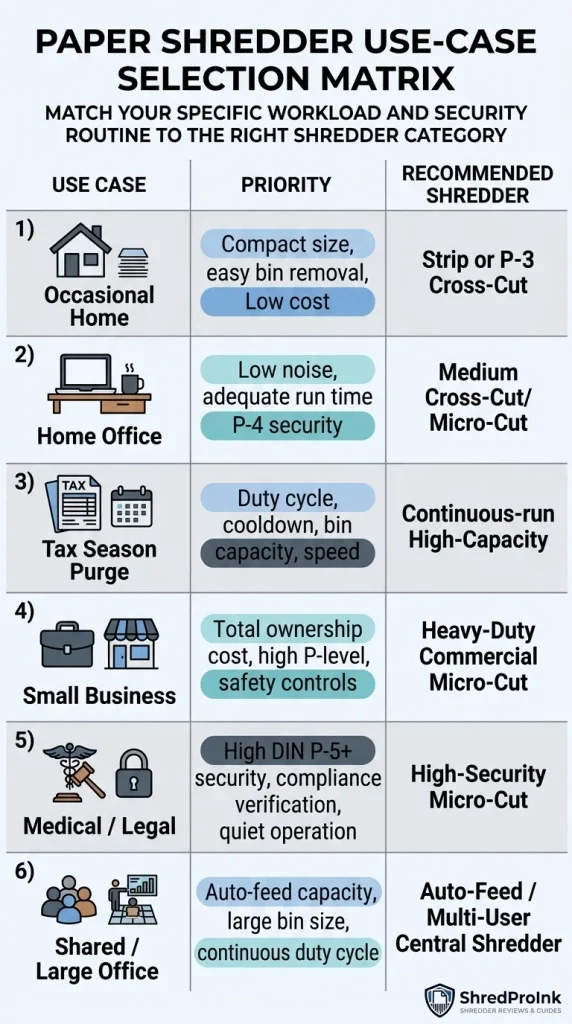
For Occasional Home Use
If you shred a small amount of ordinary household paperwork every few weeks, you don’t need an office-sized machine.
Prioritize:
- Appropriate security
- Compact dimensions
- Easy bin removal
- Basic safety features
- Reasonable price
- Simple operation
Don’t pay for a large bin or long duty cycle that you’ll rarely use.
If your documents contain personal or financial information, don’t choose strip-cut solely to save money. The document type should determine the security requirement first.
For a Home Office
The home-office buyer has a different problem.
You may shred invoices, client paperwork, mail, financial records, drafts, and other documents throughout the week.
Here, workflow fit matters more than raw sheet capacity.
Prioritize:
- Cross-cut or micro-cut security appropriate to your records
- Useful run time
- Manageable noise
- Adequate bin capacity
- Easy maintenance
- Compact footprint
- Safety features
The current Fellowes home-office range illustrates why you should compare the full specification set. Its listed models vary in sheet capacity, duty cycle, bin capacity, security, and noise features.
For Tax-Season Paper Purges
Tax-season shredding creates a different workload.
You may do very little shredding for months and then process a large pile in one session.
That makes duty cycle, cooldown time, bin size, and speed more important than they are for occasional mail.
The Federal Trade Commission advises consumers to shred certain documents containing personal or financial information when disposing of them, while retention periods vary by document type. For tax-related records, the FTC notes that tax returns and related documents may need to be retained for at least three years, with longer retention potentially applying in some situations.
Don’t use a shredder buying guide as a substitute for determining your own record-retention requirements.
For product options, see our tax-document shredder recommendations.
For a Small Business
A small business should look beyond the purchase price.
Downtime, frequent emptying, short duty cycles, maintenance, and inadequate security can all make a cheap machine expensive to operate.
Prioritize:
- Appropriate P-level
- Higher practical sheet capacity
- Longer duty cycle
- Larger bin
- Safety controls
- Easy maintenance
- Warranty terms
- Total ownership cost
A small business handling client records may also need a defensible document-destruction process. The shredder itself doesn’t automatically make that process compliant.
See our small-business heavy-duty shredder guide.
For Medical or Legal Documents
Medical and legal records require more care than ordinary household paperwork.
The right shredder depends on the information being destroyed, organizational policies, and applicable legal or regulatory requirements.
Don’t write “HIPAA compliant” into your buying checklist as though the label alone settles the issue.
Instead, verify:
- Applicable requirements
- Required destruction process
- Security level
- Internal policies
- Vendor documentation
- Record-handling procedures
If you’re responsible for compliance, confirm the requirements with your organization’s compliance officer or counsel.
For Shared or Larger Offices
Shared offices create a workload problem.
Multiple users can feed the same machine throughout the day, so duty cycle, bin size, safety controls, noise, and ease of use become more important.
Auto-feed can help when users regularly need to process batches without manually feeding every sheet. Current Fellowes AutoMax models, for example, list automatic capacities ranging from 100 to 600 sheets depending on the model, alongside manual-feed capacities and different cut types.
The important number isn’t simply the largest hopper.
Look at how long it takes to process that load and whether the machine fits the office’s daily workflow.
Features Worth Paying For
Features should solve a real problem.
Auto-Feed
An auto-feed shredder lets you load a batch rather than manually feeding every page.
This can make sense for tax-season piles, recurring office paperwork, or anyone who regularly shreds hundreds of pages.
Skip it if you usually shred only a few sheets at a time.
Current Fellowes AutoMax models demonstrate the range: some personal models accept 100 to 200 sheets automatically, while larger models go considerably higher.
Anti-Jam and Overload Protection
“Anti-jam” can mean different things.
Verify what the machine actually does:
- Detects excessive paper
- Prevents the motor from starting
- Automatically reverses
- Signals an overload
- Adjusts feeding
- Uses a sensor to estimate capacity
Don’t treat “jam-proof” as a literal guarantee. Fellowes, for example, uses “100% Jam Proof” as a product feature label on parts of its LX range. That’s a manufacturer claim, so evaluate the underlying mechanism rather than assuming the machine can never jam.
Automatic Reverse
Reverse can help when paper starts feeding incorrectly or the machine becomes overloaded.
It doesn’t make a shredder immune to jams.
It gives you another way to clear material without forcing paper through the cutters.
Manufacturer instructions should determine the correct procedure.
Full-Bin Indicator
A full-bin indicator is useful when you shred frequently.
Without one, users may continue feeding paper into an increasingly full container, which can affect operation and create unnecessary mess.
For occasional home use, this feature is convenient rather than essential.
Safety Lock and Sensors
Safety features deserve more attention than cosmetic extras.
The U.S. Consumer Product Safety Commission warns that paper shredders can cause serious finger injuries and recommends keeping children away from shredders, keeping hands away from the feed opening, and unplugging the machine when it isn’t in use.
Look for features such as:
- Safety sensors
- Safety locks
- Automatic shutoff
- Protected feed openings
These features don’t replace safe operation.
Casters
Casters matter on heavier office shredders.
If the machine stays under one desk, wheels may add little value.
If multiple people use the machine or the bin needs to move for emptying, casters can make the machine easier to handle.
Quiet Operation
For a home office, quiet operation can be worth paying for.
For a storage room or dedicated copy area, it may not matter.
Ask yourself where the shredder will operate and who will hear it.
Credit Card and CD Shredding
Only pay for this feature if you actually need it.
Many users never need to destroy optical media, and some modern records exist entirely digitally.
Check the manufacturer’s supported-material list before feeding cards or discs.
Marketing Claims vs. Useful Specifications
Marketing labels can shorten a product description, but they don’t replace measurable specifications.
| Marketing term | What to verify instead |
|---|---|
| “Jam-proof” | Overload detection, reverse function, feed controls, manufacturer instructions |
| “Heavy-duty” | Duty cycle, sheet capacity, bin size, warranty, intended usage |
| “High security” | Actual P-level and particle size |
| “Quiet” | Published noise measurement, if available |
| “Auto-feed” | Hopper capacity, cycle time, supported paper |
| “Long runtime” | Stated continuous operating time and cooldown |
| “Commercial grade” | Duty cycle, workload rating, warranty, dimensions, service terms |
This is one of the easiest ways to avoid buying based on a label.
Translate the claim into a number.
If a product says “heavy-duty,” find the duty cycle.
If it says “high security,” find the P-level.
If it says “quiet,” look for a published dB rating.
If it says “auto-feed,” check the hopper capacity and how long that load takes to process.
That gives you something you can actually compare.
How We Evaluate Paper Shredders
ShredPro Ink does not claim hands-on testing unless the testing actually happened.
For this buying guide and our product recommendations, our research process is based on:
- Manufacturer specification verification — We review published specifications for cut type, P-level, sheet capacity, duty cycle, bin capacity, supported materials, warranty, and other relevant features.
- Independent review cross-checking — We compare independent reviews to identify recurring observations and potential limitations.
- Verified-purchase feedback patterns — We look for repeated complaints or praise around issues such as jams, noise, overheating, bin handling, and durability.
- Price and availability checks — Product pricing and availability can change, so those details should be rechecked before publication or purchase.
- Claim translation — Marketing labels are compared with the underlying specifications where possible.
- Use-case matching — We don’t treat one specification as sufficient. Recommendations depend on the workload and document-security requirement.
In short:
Manufacturer data → independent evidence → buyer feedback → current market data → use-case recommendation
See our Editorial Methodology for the broader research and publishing process.
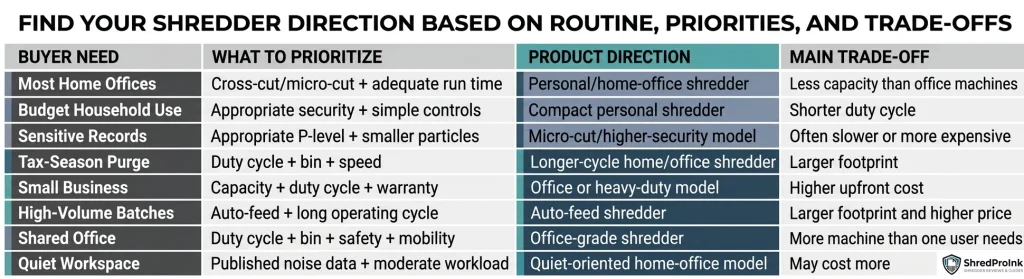
Quick Product Decision Table
This page helps you identify the type of machine you need. The dedicated Best Paper Shredders guide owns the deeper product-ranking intent and should be your next step when you want specific models.
The table below gives the product-selection path without turning P01 into another full roundup.
| Buyer need | What to prioritize | Product direction | Main trade-off |
|---|---|---|---|
| Most home offices | Cross-cut or micro-cut + adequate run time | Personal/home-office shredder | Less capacity than office machines |
| Budget household use | Appropriate security + simple controls | Compact personal shredder | Shorter duty cycle |
| Sensitive records | Appropriate P-level + smaller particles | Micro-cut or higher-security model | Often slower or more expensive |
| Tax-season purge | Duty cycle + bin + speed | Longer-cycle home/office shredder | Larger footprint |
| Small business | Capacity + duty cycle + warranty | Office or heavy-duty model | Higher upfront cost |
| High-volume batches | Auto-feed + long operating cycle | Auto-feed shredder | Larger footprint and higher price |
| Shared office | Duty cycle + bin + safety + mobility | Office-grade shredder | More machine than one user may need |
| Quiet workspace | Published noise data + moderate workload | Quiet-oriented home-office model | May cost more |
For current model-by-model recommendations, go to our paper shredder picks.
7 Paper Shredder Buying Mistakes to Avoid
A good shredder can still be the wrong purchase if you judge it using the wrong criteria.
Buying Based Only on Sheet Capacity
A 15-sheet rating sounds better than a 10-sheet rating.
It doesn’t tell you whether the machine can run long enough for your workload.
Always compare sheet capacity with duty cycle, speed, and cooldown.
Ignoring Duty Cycle
This is the classic batch-shredding mistake.
A machine can accept plenty of sheets but still force you to stop repeatedly.
If you regularly shred large piles, duty cycle belongs near the top of your checklist.
Choosing Security Based on Cut Type Alone
“Micro-cut” sounds more secure than “cross-cut,” but the actual P-level and particle-size specification provide more useful information.
Compare the published security rating instead of relying on the cut-type label alone.
Paying for Features You Won’t Use
Auto-feed, large bins, wheels, media shredding, advanced sensors, and long duty cycles all add value in the right situation.
They can add unnecessary cost in the wrong one.
Buy for your routine, not somebody else’s workload.
Buying Too Small for Seasonal Purges
If you shred only a few pages most of the year but process hundreds during tax season, your normal weekly workload isn’t the whole story.
Your peak workload matters.
A shredder that works perfectly in January’s first week may become frustrating when the entire filing cabinet reaches the machine in April.
Assuming “Jam-Proof” Means Jam-Impossible
No marketing label should replace the actual operating instructions.
Overfeeding, unsupported materials, folded sheets, and a full bin can still create problems.
Fellowes notes that a folded sheet counts as two sheets when considering maximum sheet capacity, which illustrates why the published capacity should be treated as an operating limit rather than a target to exceed.
Ignoring Maintenance Requirements
Cutters need care.
Paper dust builds up, blades can require lubrication, and incorrect maintenance can affect performance.
Check the manufacturer’s maintenance instructions before buying, especially if you’re comparing a high-use office shredder with a machine intended for occasional home use.
How to Keep Your Paper Shredder Running Properly
You don’t need a complicated maintenance routine, but you do need to follow the manufacturer’s instructions.
Oil and Lubrication
Use the lubricant specified or approved by the manufacturer.
Don’t assume household oils are interchangeable with shredder oil.
For deeper guidance, see our shredder oil and maintenance guide.
Empty the Bin Before It Becomes Overloaded
Don’t wait until shredded material is packed tightly against the cutters.
Regular emptying helps maintain normal airflow and reduces unnecessary pressure on the machine.
Clear Jams Correctly
Use the manufacturer’s reverse and clearing procedure.
Fellowes, for example, recommends alternating reverse and forward modes for short periods when clearing certain paper jams, followed by gently removing the remaining material.
See our shredder jam troubleshooting guide for the deeper process.
Respect the Duty Cycle
If the machine says 10 minutes on and 30 minutes off, don’t treat the 10-minute figure as optional.
Repeatedly exceeding the stated operating limits can turn a manageable workload into a machine problem.
Clean Paper Dust and Debris
Paper dust is part of normal shredder use.
Follow the manufacturer’s cleaning instructions and avoid improvising with liquids or tools that could damage the cutters or electrical components.
For the broader ownership guide, see our paper shredder maintenance and ownership hub.
Paper Shredder Safety Basics
⚠️ WARNING: Keep children away from paper shredders. The U.S. Consumer Product Safety Commission specifically warns that shredders can pull children’s fingers into the cutting mechanism and cause severe injuries.
Basic safety practices include:
- Keep children away from the machine, even when an adult is nearby.
- Keep fingers away from the feed opening.
- Keep loose clothing and hair away from the opening.
- Unplug the machine when appropriate, especially when it isn’t in use.
- Follow the manufacturer’s instructions for operation, maintenance, and jam clearing.
- Use safety sensors or locks when available, but don’t treat them as a replacement for supervision and safe operation.
Safety should be part of the buying decision, particularly in homes with children or pets.
Paper Shredder Buying Guide FAQs
What should I look for when buying a paper shredder?
Start with the documents you need to destroy, then determine the appropriate security level. After that, compare workload specifications such as sheet capacity, duty cycle, run time, cooldown, bin size, speed, and noise. Features such as auto-feed and safety sensors come after those core requirements.
Is cross-cut or micro-cut better?
Neither is automatically better for every buyer. Micro-cut produces smaller particles and can provide a higher level of document destruction, while cross-cut can offer a practical balance of security, throughput, and cost. Compare the actual P-level, particle size, workload, and price rather than choosing based on the cut-type name alone.
See cross-cut vs. micro-cut vs. strip-cut.
What shredder security level do I need?
The appropriate security level depends on the sensitivity of the information and any requirements that apply to your organization. DIN 66399 defines paper security levels from P-1 through P-7, with smaller permitted particle sizes at higher levels. A higher P-level isn’t automatically necessary for every household or office.
See DIN 66399 P-levels explained.
Is P-4 enough for home use?
P-4 can be a useful security level for household documents containing sensitive personal information, but there isn’t a universal rule that every home needs P-4. Check what you shred and the manufacturer’s actual particle-size specification. If your documents have special legal or organizational requirements, verify those separately.
How many sheets should a paper shredder handle?
Choose sheet capacity based on your normal feeding pattern, but don’t use it as your only workload metric. A shredder’s duty cycle, speed, cooldown period, and bin capacity can matter more when you’re processing large batches.
For a deeper comparison, see sheet capacity vs. duty cycle.
What does shredder duty cycle mean?
Duty cycle describes how long a shredder can operate before it needs to stop or cool down. For example, a specification such as 10 minutes on and 30 minutes off means the machine is designed around that operating pattern. It is one of the most important specifications for people who shred large batches.
Is an auto-feed paper shredder worth it?
It can be worth paying for if you regularly process large batches. Auto-feed lets you load multiple sheets into a hopper rather than manually feeding every page. If you normally shred only a few pages at a time, the extra cost may not provide much value.
How much should I spend on a paper shredder?
There isn’t one correct price. Your budget should follow your workload and security requirement. A basic household user may not need the capacity of a small office, while a business that shreds records every day may spend more to obtain a longer duty cycle, larger bin, stronger warranty, or better workflow.
See our current paper shredder recommendations for model-level comparisons.
How often should I oil a paper shredder?
Follow the manufacturer’s maintenance schedule rather than using one universal interval. Shredding frequency, cutter design, paper volume, and the manufacturer’s recommendations can all affect maintenance needs.
For detailed maintenance guidance, see our shredder oil guide.
Can paper shredders shred credit cards and CDs?
Some models can, but not all. Check the manufacturer’s supported-material list before feeding credit cards, CDs, DVDs, staples, or other materials. Using unsupported materials can cause jams or damage.
How long should a paper shredder last?
There isn’t a single lifespan that applies to every shredder. Usage volume, maintenance, operating conditions, build quality, and whether the machine is used within its rated workload all affect ownership life. Warranty terms can help you compare manufacturers, but a warranty isn’t a guarantee of a specific lifespan.
What size shredder do I need for a small business?
Start with the number of users, document volume, security requirement, and typical shredding sessions. A small business usually needs more than a basic personal machine when several employees share it. Focus on duty cycle, sheet capacity, bin size, security level, warranty, and maintenance rather than simply choosing the largest machine.
See our heavy-duty small-business shredder guide.
The Final Decision
The right paper shredder isn’t the machine with the biggest sheet number or the highest security label.
Choose the machine that matches your documents, required security level, normal workload, peak workload, duty cycle, capacity, and daily workflow.
For occasional household use, keep the machine simple. For a home office, pay attention to noise and run time. For seasonal document purges, prioritize duty cycle and bin capacity. For a small business, look at workload, security, warranty, and total ownership cost.
The decision path is simple:
Documents → Security → Volume → Duty Cycle → Capacity → Features → Ownership Cost → Product
If you know those requirements, you can stop comparing dozens of unrelated specifications and start comparing machines that actually fit.
Know what type of shredder you need but still want a specific model? See our Best Paper Shredders guide for current product recommendations.
Author: William Dahlberg
William Dahlberg researches and writes ShredPro Ink’s paper shredder buying guides, cross-referencing manufacturer specifications, DIN 66399 security ratings, independent reviews, and verified buyer feedback to help readers match a shredder to their actual document-security needs. See our Editorial Methodology for how recommendations are researched and published.