
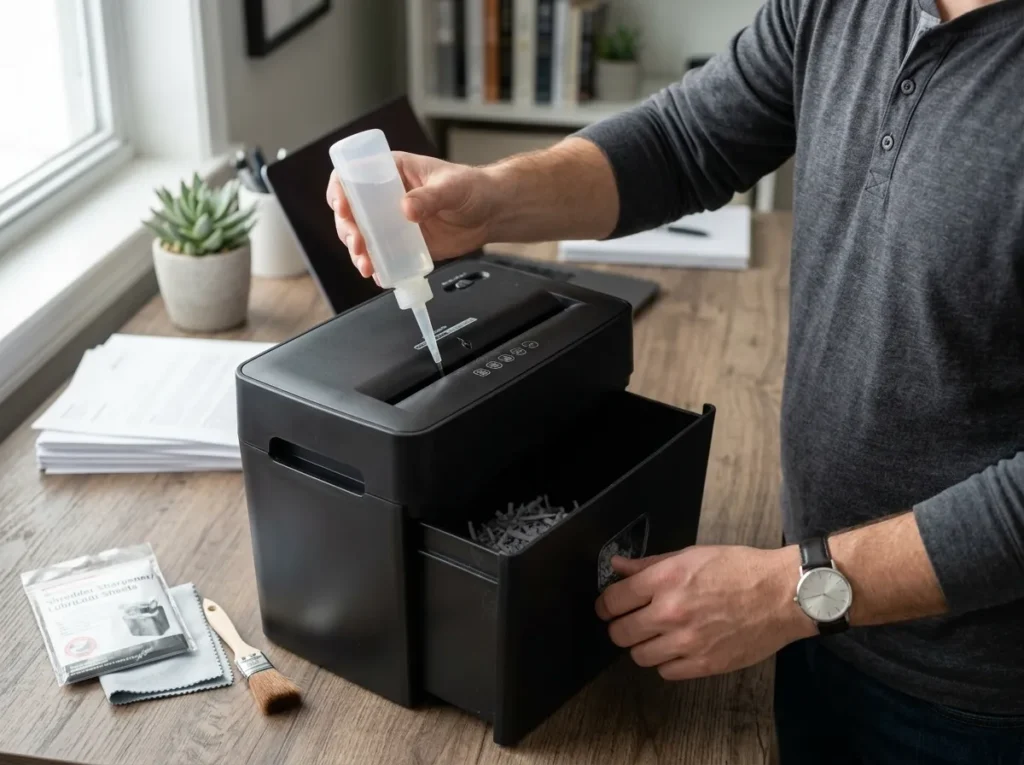
A paper shredder doesn’t need complicated care. A simple routine of lubrication, cleaning, correct feeding, bin management, and respecting the machine’s duty cycle can help keep it working properly.
The catch is that paper shredder maintenance varies by model. Some shredders require regular oiling, some use automatic lubrication, and some models have different cleaning procedures. Your owner’s manual should take priority over any general schedule.
For most owners, good paper shredder care comes down to five habits:
- Keep the cutters lubricated when the manufacturer requires it.
- Remove paper dust and debris from accessible areas.
- Stay within the rated sheet capacity.
- Empty the bin before it becomes overloaded.
- Stop and investigate repeated jams, overheating, unusual noise, or poor feeding.
If those problems continue after basic maintenance, the question changes from “How do I maintain this shredder?” to “Does this machine need service, repair, or replacement?”
This guide covers the full ownership cycle, from routine care to troubleshooting and end-of-life decisions.
Affiliate Disclosure: As an Amazon Associate, ShredProInk earns from qualifying purchases. We may earn a commission if you buy through our links, at no extra cost to you.
Paper Shredder Maintenance at a Glance
Paper shredder maintenance is the routine care that keeps the cutting system, feed mechanism, sensors, bin, and motor working within their intended operating limits. It includes lubrication where required, cleaning, correct feeding, bin management, duty-cycle management, and periodic inspection.
The exact routine depends on the machine. For example, Fellowes says its cross-cut and micro-cut shredders require lubrication for optimal performance, while its FAQ states that strip-cut shredders do not need oiling. Its product documentation also includes models with automatic oiling systems.
Use this table as a starting framework, not as a replacement for your owner’s manual.
| Maintenance task | Light home use | Regular use | Heavy office use |
|---|---|---|---|
| Check bin | Each session | Each session | Each session |
| Check feed opening | Weekly | Weekly | Several times weekly |
| Check for paper buildup | Monthly or as needed | Monthly | More often |
| Lubricate cutters | Per manufacturer | Per manufacturer | Per manufacturer or automatic system |
| Check sensors | As needed | Monthly or as needed | More frequently if problems occur |
| Review duty cycle | Before long jobs | Before long jobs | Every workday |
| Inspect performance | Every few months | Monthly | Monthly |
The goal isn’t to perform every task on a rigid calendar. The goal is to catch small problems before they become jams, downtime, mechanical wear, or a replacement decision.
The Five Habits That Matter Most
1. Lubricate correctly. Use the lubricant specified by the manufacturer and follow the model’s instructions.
2. Keep the feed area clean. Paper dust and scraps can interfere with sensors and feeding.
3. Respect sheet capacity. A shredder rated for a certain number of sheets isn’t designed to operate above that limit.
4. Manage the bin. A full bin can interfere with shredded paper leaving the cutting block and contribute to jams. Fellowes specifically identifies a full waste bin as a possible jam factor.
5. Treat repeated problems as a warning. One jam is usually a maintenance or feeding issue. Repeated jams, rapid overheating, unusual noise, or deteriorating cut performance deserve closer inspection.
Why Maintenance Varies by Shredder
Two shredders can look similar but have very different operating requirements.
Cut type, motor design, duty cycle, automatic lubrication, sensor systems, sheet capacity, and intended workload all affect ownership. Current Fellowes models, for example, show duty cycles ranging from shorter home-office cycles to substantially longer office-use cycles.
That is why a universal rule such as “oil every 30 days” is too broad to trust.
When the Owner’s Manual Overrides a General Schedule
Your owner’s manual wins whenever it gives a model-specific instruction.
Follow it for:
- Lubrication frequency
- Approved lubricant
- Sensor cleaning
- Duty cycle
- Cooldown time
- Materials the machine can shred
- Bin handling
- Disassembly restrictions
- Warranty and service procedures
ShredProInk uses general maintenance guidance to help you understand what matters. It should not override instructions written for your exact machine.
Build a Paper Shredder Maintenance Schedule
A useful maintenance schedule should be simple enough that you actually follow it.
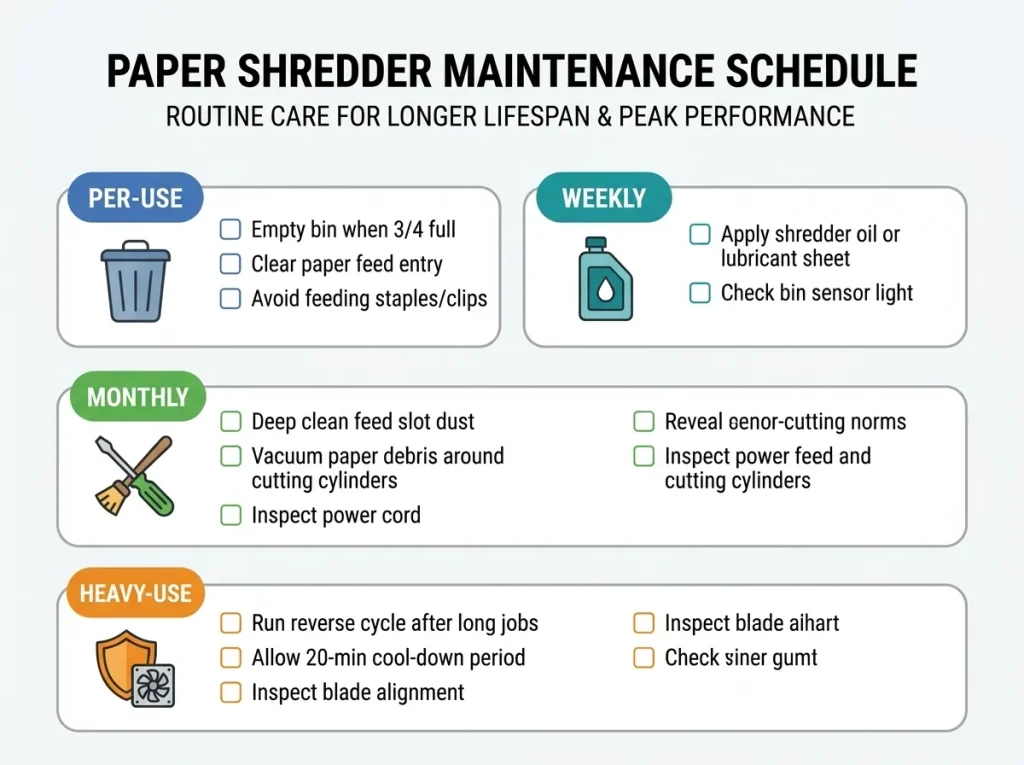
Think in four levels: before use, weekly, monthly, and heavy-use office care.
Before Each Shredding Session
Before starting a large shredding job, take a few seconds to check the machine.
Look for:
- A nearly full bin
- Paper already sitting in the feed opening
- Visible scraps around the cutters
- An active warning or overheat indicator
- Material that the manual says not to shred
- A workload that exceeds the machine’s rated capacity
If you’re about to shred a large stack, check the duty cycle first. A shredder designed for short bursts may need several cooldown periods during a large document purge.
This matters most for tax-season users and home-office professionals. A machine can have a respectable sheet-capacity number and still struggle with a large pile if its continuous runtime is short.
Weekly
For regular users, inspect the accessible feed area at least once a week.
Look for paper fragments around the entry, visible buildup, and changes in feeding behavior. If the shredder begins pulling sheets unevenly or making a new sound, don’t wait for a full jam before investigating.
You don’t need to open the motor housing or cutting assembly. Routine ownership maintenance should stay within the procedures the manufacturer permits.
Monthly
Monthly maintenance can include:
- Cleaning accessible surfaces and feed areas
- Checking the paper sensors if the model provides a cleaning procedure
- Reviewing lubrication requirements
- Inspecting the power cord and plug
- Checking whether the shredder still matches your workload
- Looking for repeated jams or overheating
- Reviewing whether the bin and accessories remain practical
Some manufacturer manuals give detailed sensor-cleaning procedures. One Fellowes manual, for example, instructs users to turn the shredder off and unplug it before cleaning its infrared sensors.
Heavy-Use Office Routine
A small business needs a different mindset from a household that shreds mail once a week.
If several employees use the same shredder, track:
- Approximate daily workload
- Frequent users or peak periods
- Repeated jams
- Cooldown interruptions
- Lubrication requirements
- Bin-emptying frequency
- Repair history
- Replacement-part availability
This is where maintenance becomes a total cost of ownership issue.
A cheap machine that repeatedly interrupts a 10-person office can cost more in lost time than its purchase price suggests.
For a deeper look at matching workload and duty cycle to the right machine, see choosing the right shredder for your workload.
TIP: Create a simple maintenance log with the date, lubrication action, cleaning, problems noticed, and repair work. You don’t need software. A spreadsheet or printed sheet is enough.
How to Oil and Lubricate a Paper Shredder
Lubrication is one of the most misunderstood parts of shredder care.
The basic reason is simple: the cutters are moving mechanical components that need appropriate lubrication when the manufacturer specifies it. Poor lubrication can contribute to friction, noise, reduced performance, and jams.
But not every shredder follows the same oiling routine.
Why Lubrication Matters
Cross-cut and micro-cut shredders use cutter assemblies that produce smaller pieces than strip-cut machines. Manufacturer guidance commonly connects lubrication with cutter performance and machine life.
Fellowes says cross-cut and micro-cut models require oil for optimal performance and recommends regular lubrication. Its FAQ separately states that strip-cut shredders do not require oiling.
That distinction matters.
Don’t assume that every shredder you own should receive the same treatment. Check the manual first.
Shredder Oil vs Lubricant Sheets
Both can be legitimate maintenance methods when the manufacturer supports them.
Shredder oil is applied to the feed opening according to the machine’s instructions. It gives you direct control over where the lubricant goes.
Lubricant sheets contain lubricant within a disposable sheet that passes through the cutters. They can be convenient for owners who don’t want to handle bottled oil.
Fellowes describes both bottled oil and lubricant sheets as maintenance options and provides separate procedures for each.
The practical difference is convenience.
| Option | Main advantage | Main limitation |
|---|---|---|
| Shredder oil | Direct lubrication and usually lower cost per application | Requires careful application |
| Lubricant sheets | Simple, clean, convenient | Higher cost per maintenance treatment |
| Automatic oiling | Reduces manual maintenance on supported models | Requires the correct oil reservoir and model-specific care |
Neither option should automatically be called “better.” The right choice depends on your shredder and the maintenance instructions provided for it.
How Often Should You Lubricate?
There is no single schedule that applies to every shredder.
One Fellowes FAQ recommends oiling each time the waste bin is emptied or at least twice a month, while another Fellowes resource gives different guidance for occasional and heavy use. Fellowes also has models with automatic oiling.
Use the manufacturer’s recommendation for your model.
If your machine has an automatic oiling system, don’t apply a manual routine designed for a conventional shredder unless the manual specifically tells you to do so.
For the detailed oiling procedure, see proper shredder oil maintenance.
Signs of Insufficient Lubrication
Possible signs include:
- Reduced sheet throughput
- More frequent jams
- Squeaking or strained sounds
- Increased resistance during shredding
- Performance that deteriorates after regular use
Fellowes identifies reduced shredding capacity, increased jams, and squeaking or labored sounds as signs that lubrication may be needed.
These symptoms don’t prove that lubrication is the cause. A full bin, unsuitable material, overheating, buildup, or mechanical wear can produce similar symptoms.
What to Avoid
Don’t reach for a random household lubricant.
Manufacturer instructions can specify the type of lubricant, and some explicitly warn against aerosol products. Fellowes warns against aerosol oils and identifies them as a fire hazard.
Follow your machine’s manual rather than assuming that an oil suitable for another mechanical device is suitable for your shredder.
How to Clean a Paper Shredder Safely
Cleaning removes paper dust and debris that can interfere with feeding, sensors, and normal operation.
It should not turn into an excuse to dismantle the machine.
Unplug Before Maintenance
Before cleaning accessible components, switch the shredder off and disconnect power when the manufacturer’s procedure requires it.
This is especially important when your hands will be near the feed opening or sensors. Manufacturer manuals commonly specify disconnecting power before sensor cleaning.
Allow a hot machine to cool before you start.
Clean the Feed Opening and Visible Debris
Start with accessible areas.
Remove loose paper fragments around the feed opening and visible surfaces according to the manufacturer’s instructions. A clean, dry maintenance tool may be appropriate for some models.
Don’t push objects deep into the cutting mechanism.
If paper is stuck inside the cutters, follow the model’s jam-clearing procedure instead.
Clean Paper Sensors When Necessary
Some shredders use sensors to detect paper entering the feed.
Paper dust can interfere with these sensors. A Fellowes manual states that paper detection sensors can become blocked by paper dust and provides a model-specific cleaning process.
Don’t assume your shredder uses the same sensor location or cleaning method.
Check the manual first.
Clean the Bin and Housing
Empty the bin before it becomes heavily packed.
Wipe accessible exterior surfaces with an appropriate dry or manufacturer-approved cleaning method. Keep moisture away from electrical components unless the manufacturer explicitly gives a different procedure.
What Not to Put Inside the Cutting Mechanism
Don’t pour household cleaners into the cutters.
Don’t spray aerosol lubricant into the feed opening.
Don’t insert tools into an energized machine.
Don’t remove internal covers unless the manufacturer specifically provides a safe procedure for that model.
Routine paper shredder care should reduce risk, not create another one.
Prevent Paper Shredder Jams Before They Happen
A good jam-prevention formula is:
correct sheet load + approved materials + proper lubrication + bin management + correct duty cycle
A jam is often easier to prevent than to clear.
Don’t Exceed Rated Sheet Capacity
Sheet capacity tells you how many sheets the manufacturer rates the machine to process in one pass.
Treat the rating as a limit, not a challenge.
Paper thickness, folded sheets, humidity, and document condition can affect real feeding behavior. If the machine begins struggling, reduce the load instead of repeatedly forcing paper through.
Feed Paper Correctly
Feed sheets straight and according to the machine’s instructions.
Don’t assume that because a shredder accepts paper, it accepts every paper configuration.
Check the manual before feeding:
- Folded documents
- Labels
- Adhesive material
- Card stock
- Envelopes
- Laminated sheets
- Staples
- Paper clips
- Credit cards or other non-paper items
Fellowes specifically warns that feeding materials not rated for a machine can cause jams or serious damage.
Keep Cutters Lubricated
If your model requires lubrication, follow its maintenance schedule.
Lubrication is one part of jam prevention, not a cure for every jam.
Empty the Bin Before It Becomes a Problem
A full bin can prevent shredded material from falling away from the cutting block properly.
That can contribute to jams, so bin management belongs in the same maintenance routine as oiling and cleaning.
Use the Reverse Function Correctly
Reverse can help clear paper from the cutting mechanism on supported models.
Follow the manual. Don’t keep switching forward and reverse indefinitely while the machine is overloaded or making unusual mechanical sounds.
For detailed jam diagnosis and anti-jam technology, see maintenance that prevents jams.
What to Do When a Paper Shredder Overheats
A shredder getting warm during operation doesn’t automatically mean something is broken.
Most shredders have operating limits. Once the motor reaches a certain temperature, thermal protection can stop the machine until it cools.
Normal Thermal Shutdown vs. a Problem
The key question is whether the shutdown matches the machine’s intended duty cycle.
For example, current Fellowes home-office models list different operating and cooldown periods depending on the model. One LX-series range includes duty cycles from 5 minutes on / 30 minutes off through 20 minutes on / 30 minutes off, while office models offer longer cycles.
That difference is why “my shredder overheats” needs context.
Why Duty Cycle Matters
Duty cycle means how long a shredder can operate before it needs a cooling period.
A user with 300 pages to destroy may need a machine with a much longer duty cycle than someone shredding five envelopes a week.
If you regularly exceed the machine’s intended workload, maintenance won’t fix the underlying mismatch.
How Cooldown Affects Workflow
When an overheat indicator appears, stop feeding paper and let the machine cool according to its instructions.
Fellowes troubleshooting guidance, for example, tells users with an overheat indicator to allow the shredder to cool before trying again.
Don’t repeatedly restart a hot machine just to squeeze out another few sheets.
When Repeated Overheating Suggests a Mismatch
Repeated shutdowns can point to:
- Workload above the machine’s intended use
- Excessive sheet loads
- Long uninterrupted sessions
- Poor maintenance
- A clogged or restricted feed area
- Mechanical wear
- A machine that no longer fits the workload
If your office regularly hits thermal limits, the answer may be a higher-capacity shredder rather than more aggressive maintenance.
Shredder Bin, Bags and Maintenance Accessories
Maintenance accessories should solve a real ownership problem.
You don’t need a drawer full of shredder products.
When to Empty the Shredder Bin
Empty the bin when the manufacturer indicates it is full or when shredded material is approaching the level that interferes with normal operation.
A transparent bin window makes this easier, but not every shredder has one.
Are Shredder Bags Worth Using?
Shredder bags can make collection and disposal easier, especially in offices that empty the machine frequently.
They are a convenience item, not a requirement for every owner.
Check the bag dimensions and compatibility before buying.
Shredder Oil and Lubricant Sheets
Choose the maintenance method supported by your model.
For frequent users, bottled oil can make sense if the manual calls for it. For occasional users who want a simple process, lubricant sheets may be more convenient.
Cleaning Tools
Keep maintenance tools simple.
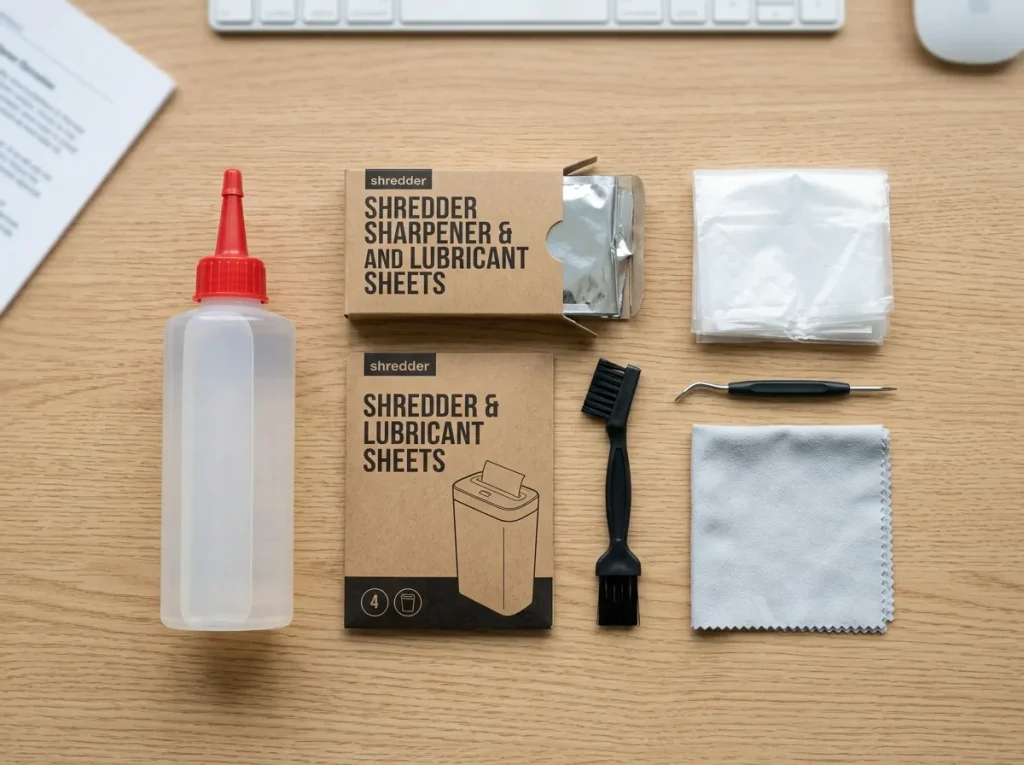
A suitable brush, cotton swab, or microfiber cloth may be useful for accessible areas when the manufacturer permits that method. The correct tool depends on the machine.
Which Accessories Are Genuinely Useful?
For most owners, the useful categories are:
- Shredder oil: for models that require manual lubrication
- Lubricant sheets: convenient lubrication for compatible models
- Shredder bags: easier waste collection
- Basic cleaning tools: for accessible feed and sensor areas
Maintenance Supplies: Check current prices for compatible shredder maintenance products.
The product category should always be matched to your machine before purchase.
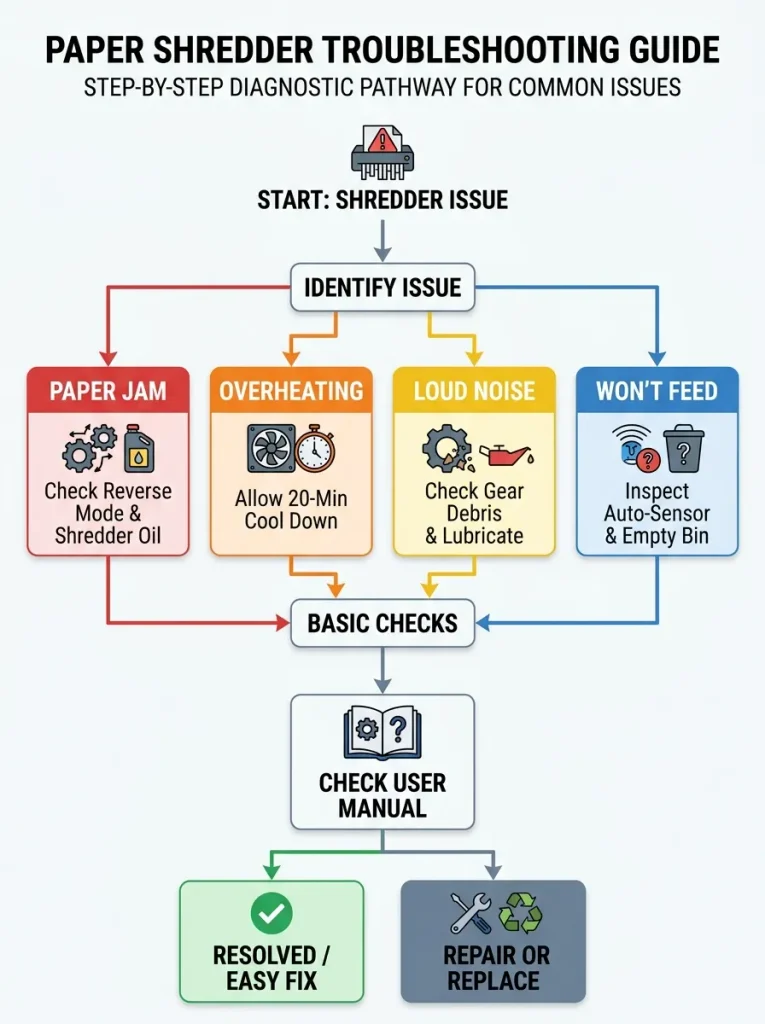
Paper Shredder Troubleshooting: Diagnose the Problem
Maintenance should help you identify whether a problem is minor or whether the machine needs service.
Use this table as a first-pass diagnosis. Your owner’s manual takes priority for model-specific procedures.
| Symptom | Likely causes | First action |
|---|---|---|
| Keeps jamming | Overload, debris, lubrication, unsuitable material | Stop, reduce load, check approved materials and manual |
| Runs slowly | Heat, friction, buildup, wear | Stop and allow cooling, then inspect accessible areas |
| Won’t pull paper | Sensor issue, feed obstruction, safety control | Switch off and inspect the feed area |
| Gets hot quickly | Duty cycle, overload, wear | Stop and allow full cooldown |
| Unusual noise | Friction, buildup, mechanical wear | Stop using it and inspect according to the manual |
| Poor cut quality | Cutter condition, lubrication, wear | Review maintenance requirements |
| Runs without pulling paper | Sensor contamination or control issue | Switch off, unplug, and inspect the approved sensor area |
Shredder Keeps Jamming
Start with the basics.
Check sheet load, document type, bin level, lubrication requirements, and the reverse function.
If the same jam returns after you correct those factors, don’t keep forcing the machine to work. Repeated jams can indicate a deeper mechanical or workload problem.
Shredder Runs Slowly
Slow operation can have several causes.
A hot motor may simply need cooldown. Paper buildup or inadequate lubrication can affect performance on compatible models. Mechanical wear can create similar symptoms.
Stop and let the machine cool before deciding that it needs repair.
Shredder Makes Unusual Noises
A new squeak, grinding sound, or labored sound deserves attention.
Lubrication can be relevant, but don’t assume it is the only explanation. A damaged component or mechanical wear can require service.
If the noise appears suddenly or becomes severe, stop using the shredder.
Shredder Overheats Quickly
Compare the workload with the machine’s rated duty cycle.
If you are asking a short-run home-office machine to process a large office backlog, the machine may simply be undersized.
If overheating occurs during light use, investigate further and consult the manual or manufacturer.
Shredder Runs but Doesn’t Pull Paper
Check for:
- Paper dust around sensors
- A blocked feed opening
- Safety controls
- An incorrectly seated bin
- A full bin
- A jammed cutting mechanism
Disconnect power before performing any inspection that brings your hands near the feed mechanism.
Shredder Won’t Start
Check basic conditions first.
Is the power connected? Is the bin correctly seated? Is a safety switch active? Is an overheat indicator still showing?
Manufacturer troubleshooting documentation often includes model-specific safety and sensor conditions, so use the manual before attempting anything more involved.
Cut Quality Has Deteriorated
Poor cut quality can indicate cutter condition, lubrication requirements, overloading, or wear.
If maintenance doesn’t restore normal performance, compare the repair path with replacement cost.
When Should You Repair or Replace a Paper Shredder?
This is where maintenance becomes an ownership decision.
A shredder doesn’t need to be replaced simply because it is old. It also doesn’t make financial sense to keep repairing a machine that repeatedly fails or no longer fits the workload.
Use this framework:
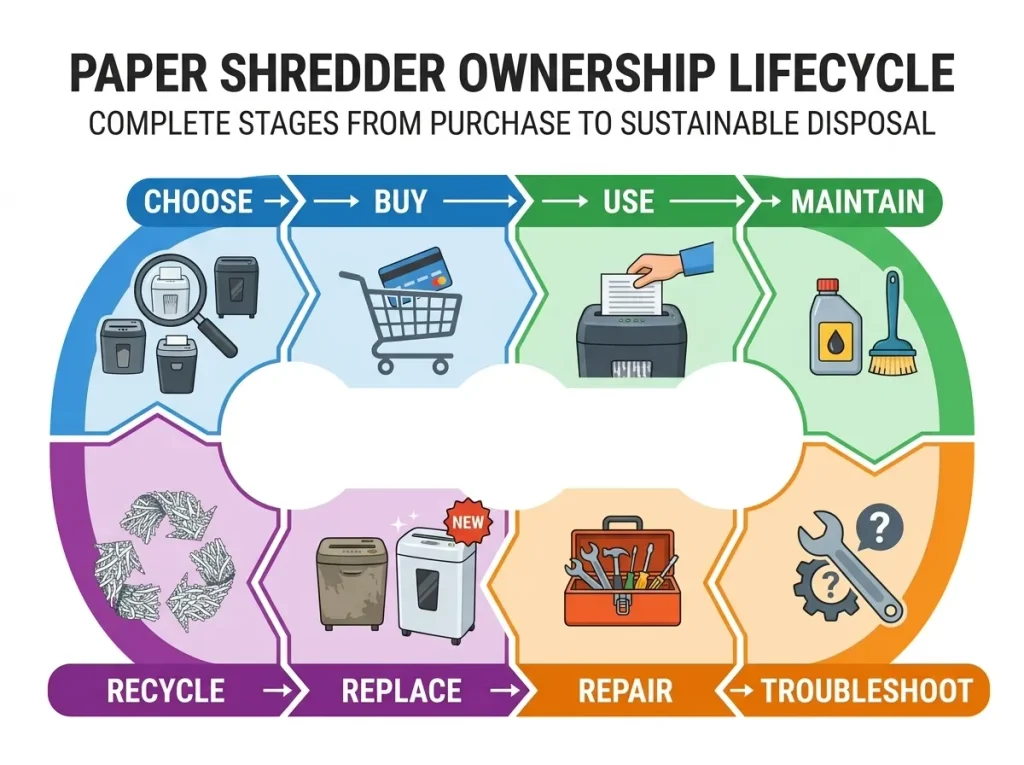
Keep → Maintain → Repair → Replace
Signs the Shredder Still Has Useful Life
Keep maintaining the machine when:
- It handles your normal workload.
- Problems are infrequent.
- Replacement parts remain available.
- The manufacturer still supports the model.
- The repair is relatively minor.
- Security requirements have not changed.
- Downtime is low.
A well-maintained older shredder can remain useful if it still matches the owner’s actual needs.
Signs the Machine Is Approaching End of Life
Replacement becomes more reasonable when several problems appear together:
- Repeated mechanical failures
- Frequent jams after basic maintenance
- Rapid overheating during normal workloads
- Parts are difficult to find
- Warranty coverage has ended
- Repair costs keep accumulating
- The shredder no longer handles your document volume
- Your required security level has changed
Age alone shouldn’t make the decision.
Repair Cost vs. Replacement Cost
For a small business, calculate more than the repair invoice.
Consider:
repair cost + downtime + lost staff time + future repair risk
Then compare that with:
replacement cost + expected maintenance + improved capacity
You don’t need a complicated financial model.
Suppose an office spends $90 on a repair but loses several hours of staff time waiting for the machine and expects another repair soon. A replacement with a longer duty cycle may make more financial sense even if its purchase price is higher.
The reverse can be true for a lightly used home shredder that needs one inexpensive repair.
Warranty and Replacement Parts
Check the warranty before paying for repairs.
Review:
- Warranty period
- Covered components
- Authorized service requirements
- Replacement-part availability
- Labor coverage
- Exclusions for misuse
Improper materials, unauthorized repairs, or operation outside the manufacturer’s instructions can affect warranty coverage on some models. Manufacturer documentation should be your source for the exact terms.
When a Higher-Capacity Machine Makes More Sense
If maintenance is becoming a daily struggle, the machine may be the problem.
A home-office user with occasional paperwork may need only a compact shredder. A small business processing confidential records every day may need a longer duty cycle, larger bin, higher sheet capacity, or automatic lubrication.
For replacement research, see choosing a replacement paper shredder.
How to Extend the Life of Your Shredder
Extending the life of your purchase isn’t about making an old machine run forever.
It’s about avoiding preventable wear and replacing it when continued ownership stops making sense.
Use this formula:
right workload + correct maintenance + early troubleshooting + sensible replacement
Match Workload to Duty Cycle
Don’t buy or keep using a shredder that spends most of its working life overheated.
Duty cycle should match the volume you actually process.
Maintain Before Performance Drops
Don’t wait for a complete jam before checking lubrication, bin condition, or paper buildup.
Small maintenance actions are easier than recovering from repeated failures.
Don’t Ignore Repeated Jams
One jam can happen.
A pattern of jams tells you something has changed.
Look for overload, unsuitable material, poor lubrication, bin problems, sensor contamination, or mechanical wear.
Store the Machine Appropriately
Keep the shredder in a dry location and avoid placing objects where they can fall into the feed opening.
If the manufacturer gives storage or transport instructions, follow those instructions.
Keep a Simple Maintenance Record
Record maintenance dates and recurring faults.
For a business, this can help reveal whether the shredder is becoming a recurring cost rather than a useful asset.
The goal is simple: keep the machine working reliably until replacement becomes the more sensible ownership decision.
Shredder End of Life: Replacement, Disposal and Recycling
Replacing the machine creates a second document-security problem: what happens to the old equipment and the information waiting to be destroyed?
Don’t treat machine disposal and shredded-paper disposal as the same task.
What to Do Before Replacing the Machine
Before removing an old shredder from service:
- Clear any remaining paper from the feed mechanism.
- Empty the waste bin.
- Check whether documents remain in the surrounding work area.
- Review the manufacturer’s disposal or recycling guidance.
- Remove accessories only when appropriate for the disposal method.
- Keep sensitive documents under control during the transition.
Separate the Machine From Shredded-Paper Disposal
The shredder itself is equipment.
The material inside its bin is shredded paper.
They may follow different recycling or disposal processes depending on your local rules and service provider.
For detailed shredded-paper disposal guidance, see shredder recycling and disposal.
Recycling Considerations
Check the manufacturer first for product-specific recycling information.
Then check the requirements of your local recycling or electronic-equipment program. Rules can vary by location and equipment type, so don’t assume that a household curbside program accepts a complete electric shredder.
When Repair Is No Longer Practical
A machine has reached the end of its useful ownership cycle when the cost, risk, downtime, or workload mismatch outweighs the benefit of keeping it.
That doesn’t necessarily mean the shredder is physically unusable.
It means continued ownership no longer makes sense for the job.
Paper Shredder Maintenance Checklist
Use this as a quick routine. Add the exact requirements from your owner’s manual.
Daily / Per Use
- Check the bin level.
- Stay within sheet capacity.
- Feed only approved materials.
- Watch for abnormal heat or noise.
- Stop if the machine behaves differently from normal.
Weekly
- Inspect the feed opening.
- Remove visible paper debris.
- Check for repeated feeding problems.
- Review whether the bin is being emptied often enough.
Monthly
- Follow the manufacturer’s lubrication schedule.
- Clean accessible areas.
- Check sensors if the manual provides a cleaning procedure.
- Inspect the power cord and plug.
- Review recurring jams or overheating.
Periodically
- Review overall performance.
- Check whether the machine still fits your workload.
- Review warranty and parts availability.
- Compare accumulated repair costs with replacement options.
Printable Checklist: ShredProInk plans to offer a downloadable maintenance checklist for readers who want a simple record they can keep near the machine.
Frequently Asked Questions About Paper Shredder Maintenance
How Often Should I Oil a Paper Shredder?
The correct frequency depends on the model and manufacturer. Some manufacturers recommend oiling after each bin emptying or at least twice monthly for applicable shredders, while other models use automatic lubrication or don’t require manual oiling. Check your owner’s manual before creating a schedule.
Do All Paper Shredders Need Oil?
No. Maintenance requirements vary by shredder. Fellowes states that its cross-cut and micro-cut shredders require oil for optimal performance, while its FAQ says strip-cut shredders do not need oiling. Some models use automatic oiling systems.
Are Lubricant Sheets as Good as Shredder Oil?
Lubricant sheets can be a convenient maintenance option for compatible shredders. Fellowes provides both oil and lubricant-sheet procedures. The important factor is whether the maintenance method is suitable for your specific model and follows its instructions.
Why Does My Shredder Keep Jamming?
Common causes include overloading, unsuitable materials, a full bin, paper buildup, and inadequate lubrication on models that require it. Reduce the sheet load, check the approved materials, empty the bin, and follow the manufacturer’s jam-clearing procedure. Repeated jams may indicate wear or a workload mismatch.
How Do I Stop a Shredder From Overheating?
Respect the machine’s duty cycle and allow the required cooldown period. If it overheats during normal use, check for overloading, buildup, maintenance problems, or mechanical wear. Current shredder models can have very different operating and cooldown limits, so use the model’s manual rather than a universal runtime.
How Do I Clean Shredder Blades?
Don’t treat the cutters like a household appliance that can simply be washed or sprayed. Turn the machine off and disconnect power when the manufacturer’s procedure requires it, then clean only accessible areas using the approved method. Don’t dismantle the cutting assembly unless the manufacturer specifically permits it.
How Often Should I Empty the Bin?
Empty the bin when it reaches the manufacturer’s recommended level or before shredded paper begins interfering with normal cutting. A full bin can contribute to jams because shredded material may not fall away from the cutting block correctly.
How Long Should a Shredder Last?
There is no single lifespan that applies to every shredder. Service life depends on workload, duty cycle, maintenance, construction, operating conditions, and how closely the machine is used within its rated limits. Track recurring problems rather than replacing a machine based on age alone.
When Should I Repair a Shredder?
Repair can make sense when the machine still fits your workload, parts remain available, the repair cost is reasonable, and failures are isolated. Warranty coverage should be checked first. A repair becomes less attractive when failures repeat or downtime starts costing more than the machine is worth.
When Should I Replace a Shredder?
Consider replacement when the shredder repeatedly fails, overheats during normal workloads, no longer meets your security or capacity needs, lacks available parts, or accumulates repair and downtime costs. A higher-capacity machine may make more sense when your workload has increased.
Can I Use Household Oil?
Don’t assume that a household oil is safe for your shredder. Use the lubricant specified by the manufacturer. Some manufacturer guidance permits certain vegetable-based oils for specific models but warns against aerosol lubricants. Follow the instructions for your exact machine.
What Should I Do With an Old Shredder?
First, remove remaining documents and empty the waste bin. Then check the manufacturer’s recycling or disposal guidance and your local equipment-recycling rules. Keep the shredder separate from shredded-paper disposal because the machine and its paper waste can follow different handling routes.
The Bottom Line: Good Maintenance Is a System
Good paper shredder maintenance isn’t about oiling the cutters and hoping for the best.
It is a complete ownership routine:
Maintain → Prevent → Troubleshoot → Repair → Replace → Dispose
Start with the manufacturer’s instructions. Keep the feed area clean, manage the bin, respect sheet capacity and duty cycle, and investigate repeated problems early.
If a maintenance routine keeps your shredder reliable, keep using it.
If the machine repeatedly fails, no longer fits your workload, or costs too much to keep running, replacement may be the more sensible ownership decision.
For buyers who need to replace an aging machine, compare current options in the Best Paper Shredders guide.
For readers focused on document security rather than machine ownership, continue with document security and secure destruction guidance.
Illustrative Ownership Case Study
This is an illustrative scenario, not a ShredProInk customer case study.
A small office has four employees using one shredder for client paperwork. The machine originally handled the workload, but staff begin reporting frequent jams and thermal shutdowns.
The office could immediately buy another shredder. A better first step is to diagnose the ownership pattern.
The manager checks the bin, sheet loads, approved materials, lubrication requirements, and duty cycle. The office discovers that employees are routinely feeding large batches that exceed the machine’s practical operating cycle.
The maintenance problem is real, but the deeper problem is workload mismatch.
The office can then compare two paths:
| Option | What it addresses |
|---|---|
| Maintain current machine | Reduces preventable problems if the machine remains suitable |
| Replace with higher-capacity model | Addresses recurring workload and downtime if the current machine is undersized |
The lesson is simple: maintenance should help you identify the real ownership problem. It shouldn’t become an excuse to keep an unsuitable machine running forever.
ShredProInk Maintenance Methodology
ShredProInk builds maintenance guidance by comparing manufacturer maintenance instructions, product manuals, independent technical sources, and current product information. When requirements vary by model, we identify that variation instead of presenting one schedule as universal.
We do not claim hands-on testing or repair experience unless that work has actually been performed and documented.
That approach follows ShredProInk’s editorial standard of using methodology language that reflects the work actually completed rather than invented first-person testing.
Author: William Dahlberg
William Dahlberg researches and writes ShredProInk’s paper shredder buying and ownership guides, cross-referencing manufacturer specifications, maintenance instructions, and verified buyer feedback to help readers match a shredder to their actual document-security needs. See our Editorial Methodology for how our recommendations are built.