
Affiliate Disclosure: As an Amazon Associate, ShredProInk earns from qualifying purchases. We may earn a commission if you buy through our links, at no extra cost to you.
A best heavy-duty shredder for small business needs to do more than advertise a high sheet count. Your office size, weekly document volume, security requirement, run time, bin size, and number of users matter more than one headline specification.
For a 2 to 20-person business, the right choice can range from a shared small-office machine to a commercial-grade unit with continuous operation. Auto-feed can make sense for document purges, while P-4 may cover many confidential records without paying for P-5 security you don’t need.
Our five comparison picks cover those different workloads:
| Model | Best For | Security | Manual Feed | Auto-Feed | Price |
|---|---|---|---|---|---|
| Aurora AU200MA | High-security batch shredding | P-5 | 10 sheets | 200 sheets | Check Current Price |
| Bonsaii C283-A | Hands-free office workflow | P-4 | 12 sheets | 200 sheets | Check Current Price |
| Fellowes Powershred 99Ci | 1-3 user office | P-4 | 18 sheets | — | Check Current Price |
| Fellowes Powershred 225Ci | Higher-volume shared office | P-4 | 22 sheets | — | Check Current Price |
| Amazon Basics AU200XA | Lower-cost auto-feed option | P-4 | 10 sheets | 200 sheets | Check Current Price |
Quick answer: For high-security batch shredding, the Aurora AU200MA stands out on paper with P-5 security, 200-sheet auto-feed, and a 60-minute run time. For a shared office where several employees feed documents manually, the Fellowes 99Ci has a different advantage: an 18-sheet manual capacity, P-4 security, 30-minute run time, and a 9-gallon bin.
If your office handles large document purges, the 200-sheet auto-feed models can reduce the amount of time someone spends standing at the machine. If several employees need to shred throughout the day, a continuous-duty commercial machine changes the calculation.
For the broader category, see our top recommendations this year.
What Makes a Shredder Heavy-Duty?
A heavy-duty paper shredder is built for higher-volume office work through a combination of sheet capacity, operating time, waste capacity, workload rating, and construction. A machine does not become heavy-duty simply because its feed slot accepts more sheets.
The biggest mistake is treating peak sheet capacity as workload capacity.
A shredder rated for 22 sheets can process more sheets in one pass than an 18-sheet machine. That does not automatically make it the better choice for your office. If the 18-sheet machine has a longer practical work window, easier bin handling, and a better fit for your user count, it may produce a smoother workflow.
Sheet Capacity Is Not Workload Capacity
Manufacturer sheet ratings usually describe the maximum number of sheets the machine can accept under stated conditions. Paper weight, humidity, folded sheets, and other factors can reduce actual capacity.
The more useful question is:
How much paper will your employees feed through the machine during a normal workday?
That leads directly to duty cycle.
Duty Cycle Matters More Than Peak Capacity
Duty cycle describes how long a shredder can operate before it needs a cooling period. The Fellowes 99Ci, for example, is rated for 30 minutes of operation followed by 40 minutes off, while the 225Ci is rated for continuous operation.
That difference matters when several employees share one machine.
A 10-person office may care less about whether a machine accepts 18 or 22 sheets than whether the machine can keep working when several people have documents to destroy.
When Does a Small Business Need Commercial-Grade Equipment?
A commercial-grade paper shredder starts making more sense when:
- Multiple employees share one machine.
- Document volume is regular, rather than occasional.
- Large purge jobs happen during tax, audit, retention, or office-cleanout periods.
- Downtime affects employees who are waiting to destroy records.
- A larger waste bin reduces frequent emptying.
- Longer runtime matters more than compact size.
Your office does not need a huge departmental shredder simply because it has 10 employees. Match the machine to actual paper volume.
Five Specifications That Matter in a Business Shredder
The right heavy-duty paper shredder for an office starts with five measurements.
1. Security Level and Particle Size
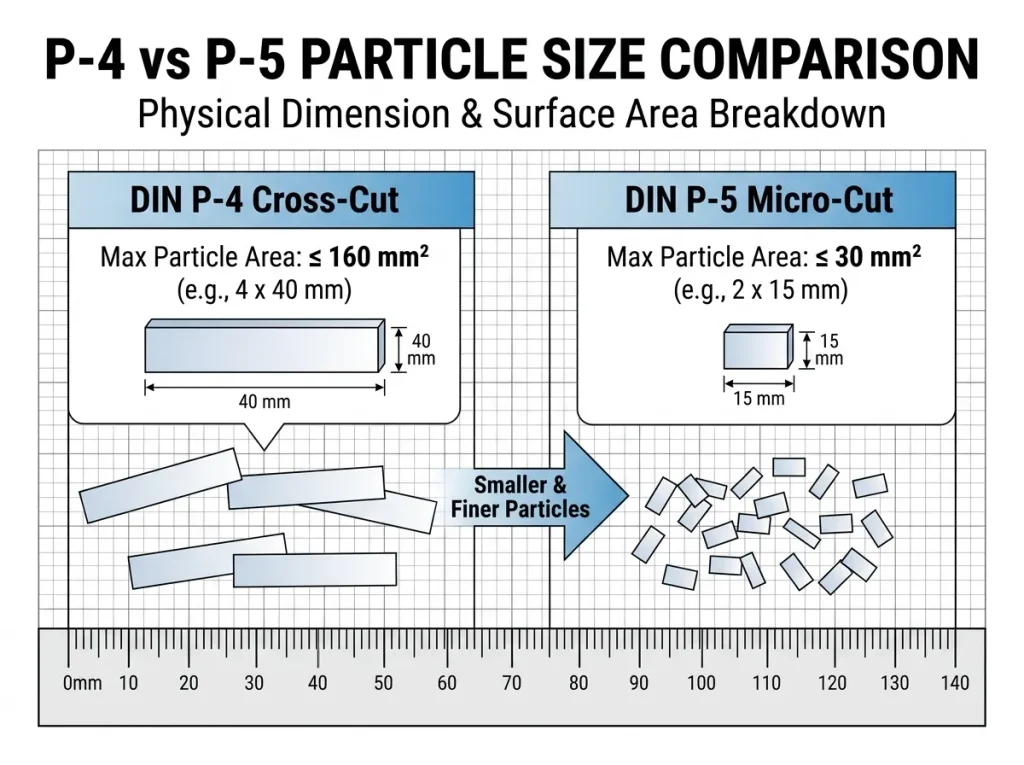
P-4 and P-5 describe levels used for paper destruction security. P-5 produces smaller particles than P-4, but the correct choice depends on the sensitivity of the records and your organization’s requirements.
One standards update matters here: DIN 66399 has been withdrawn, with DIN pointing users toward the ISO/IEC 21964 series. ISO/IEC 21964-2 remains a published standard covering requirements for machines used to destroy data carriers.
Product manufacturers still commonly use P-level terminology in their current specifications, so you’ll see P-4 and P-5 throughout this comparison.
2. Duty Cycle
Look at the stated runtime and cooldown period, not just the phrase “heavy-duty.”
The Amazon Basics AU200XA, for example, is documented with up to 60 minutes of auto-feed operation and a 10-minute manual-feed runtime before cooldown. The Bonsaii C283-A documentation lists up to 60 minutes in auto-feed mode and 30 minutes in manual mode.
3. Sheet Capacity
Treat sheet capacity as a per-pass measurement, not a promise about daily throughput.
A machine that accepts 22 sheets does not mean your office can continuously process 22-sheet stacks without interruption.
4. Bin Capacity
A larger bin means fewer trips to empty shredded paper.
The Fellowes 99Ci has a 9-gallon bin, while the 225Ci has a 16-gallon bin. The Aurora AU200MA has an 8.5-gallon pull-out bin.
For a shared office, bin capacity becomes an employee-time issue rather than a simple convenience feature.
5. User Count and Workflow
Manufacturer user recommendations help you separate personal, shared-office, and departmental machines.
Fellowes lists the 99Ci for 1 to 3 users and the 225Ci for shared commercial use. Its current promotional material places the 225Ci at 5+ users.
Treat those figures as manufacturer guidance, not a law. Your actual workload matters more.
Best Heavy-Duty Shredders for Small Business
We compare these models using manufacturer specifications, documented product information, independent product information where needed, and current availability checks. We do not claim hands-on testing unless the machine has actually been tested by ShredProInk.
Aurora AU200MA: Best for High-Security Auto-Feed Shredding
Best For: Offices handling sensitive records that want P-5 security and batch feeding.
Security: P-5
Manual capacity: 10 sheets
Auto-feed: 200 sheets
Runtime: 60 minutes
Bin: 8.5 gallons
The Aurora AU200MA is built around a straightforward business workflow: load a stack, start the auto-feed cycle, and let the machine process the batch. Aurora lists a 200-sheet automatic capacity, 10-sheet manual capacity, P-5 micro-cut security, a 60-minute continuous runtime, and an 8.5-gallon pull-out bin.
The documented particle size is 2 x 12 mm, and Aurora lists automatic reverse for jam clearing plus indicators for conditions such as overload, overheating, and a full bin.
What works
- P-5 security suits buyers prioritizing smaller particle size.
- 200-sheet auto-feed fits batch shredding.
- 60-minute runtime supports larger document purges.
- 8.5-gallon bin reduces emptying frequency.
What to watch
- 10-sheet manual capacity is lower than the Fellowes 99Ci and 225Ci.
- P-5 may cost more than needed for ordinary confidential office paperwork.
- Auto-feed is most useful when your office regularly has batches to process.
Who should buy it: An accounting, legal, consulting, or professional office that regularly destroys sensitive paperwork in batches.
Who should skip it: A 1-person or low-volume office that rarely accumulates more than a small stack of documents.
Bonsaii C283-A: Best for Hands-Free Office Workflow
Best For: Small businesses that want 200-sheet auto-feed capacity with flexible manual feeding.
Security: P-4
Manual capacity: 12 sheets
Auto-feed: 200 sheets
Runtime: Up to 60 minutes in auto-feed mode
Bin: 8.1 gallons
The Bonsaii C283-A takes a similar workflow approach but uses P-4 micro-cut security. Its documentation lists 200-sheet auto-feed capacity, 12-sheet manual capacity, up to 60 minutes of auto-feed operation, and an 8.1-gallon pull-out bin.
Bonsaii lists a particle size of 4 x 12 mm and noise of up to 58 dB. Its manual states that heavier or more humid paper can reduce shredding capacity, which is a useful reminder that headline sheet counts have operating conditions.
What works
- 200-sheet auto-feed handles batch jobs.
- 12-sheet manual feed gives more flexibility than the Aurora.
- P-4 micro-cut suits many confidential business documents.
- 8.1-gallon bin supports shared use.
What to watch
- P-4 is less fine than the Aurora’s P-5 output.
- Auto-feed is limited to paper in the documented operating instructions.
- A 60-minute rating does not mean every workload will process at the same rate.
Who should buy it: A small office that wants hands-free batch shredding without moving into a large departmental machine.
Who should skip it: A business that has employees feeding documents throughout the day and needs continuous manual-feed operation.
Fellowes Powershred 99Ci: Best for a 1-3 User Shared Office
Best For: Small offices where employees manually feed documents throughout the workday.
Security: P-4
Manual capacity: 18 sheets
Auto-feed: None
Runtime: 30 minutes on / 40 minutes off
Bin: 9 gallons
The 99Ci takes a different route from the auto-feed models. Fellowes rates it for 18 sheets per pass, P-4 cross-cut security, 1 to 3 users, a 30-minute run time, and a 9-gallon pull-out bin.
That makes it a useful example of why “heavy-duty” should not mean “maximum sheet count.”
For a small shared office, a machine with an 18-sheet manual capacity and a 30-minute work period can make more sense than buying a large auto-feed model that spends most of its life underused.
What works
- 18-sheet capacity is strong for manual feeding.
- P-4 security suits many confidential business documents.
- 9-gallon bin works well for shared office use.
- 1-3 user rating makes the intended workload clear.
What to watch
- 40-minute cooldown can interrupt larger purge jobs.
- No auto-feed means someone must remain at the machine.
- The 1-3 user recommendation makes it a weaker fit for a heavily shared 10-person office.
Who should buy it: A small professional office with 1 to 3 regular users.
Who should skip it: A 5+ user office with frequent large shredding batches.
Fellowes Powershred 225Ci: Best for Higher-Volume Shared Offices
Best For: Offices with multiple users and sustained shredding requirements.
Security: P-4
Manual capacity: 22 sheets
Auto-feed: None
Runtime: Continuous
Bin: 16 gallons
The Fellowes 225Ci is the most clearly commercial model in this group. Fellowes documentation lists 22 sheets per pass, P-4 security, continuous operation, a 16-gallon bin, a 9.5-inch throat, and a 2-year machine warranty with lifetime coverage on the cutters.
That continuous-duty rating changes the buying calculation.
A business that regularly has several employees feeding documents does not have to plan the workflow around a short motor cycle. The 16-gallon bin further reduces the number of interruptions for waste handling.
What works
- Continuous operation suits high-volume workflows.
- 22-sheet capacity is the highest manual rating in this group.
- 16-gallon bin reduces emptying frequency.
- Commercial positioning matches shared-office workloads.
What to watch
- It is physically much larger and heavier than small-office units.
- P-4 may be enough for your documents, but it does not provide P-5 particle size.
- A large departmental machine can be unnecessary for a low-volume 2-3 person office.
Who should buy it: A busy accounting, legal, real estate, or professional office where several people share the shredder.
Who should skip it: A small office that only shreds occasionally.
Amazon Basics AU200XA: Lower-Cost Auto-Feed Option
Best For: Buyers who want 200-sheet auto-feed and P-4 security without moving to a large departmental machine.
Security: P-4
Manual capacity: 10 sheets
Auto-feed: 200 sheets
Runtime: 60 minutes in auto-feed mode
Bin: 8.5 gallons
The Amazon Basics AU200XA uses a 200-sheet automatic feed tray and 10-sheet manual feed. Available product documentation lists P-4 cross-cut security, a 60-minute auto-feed runtime, a 10-minute manual runtime, an 8.5-gallon pull-out bin, and automatic shutoff for overheating.
The model deserves a place in the comparison as a value-oriented reference point, but verify the exact model number and current listing before publication. Amazon Basics has multiple 200-sheet shredders with different cut types and security levels.
What works
- 200-sheet auto-feed suits document batches.
- P-4 security fits many business records.
- 8.5-gallon bin is appropriate for office use.
- 60-minute auto-feed rating supports longer batch sessions.
What to watch
- The 10-sheet manual capacity is modest.
- Current price and availability can change.
- Do not confuse the AU200XA with the P-5 AU220MA.
Who should buy it: A budget-conscious small business that values batch feeding.
Who should skip it: An office that needs continuous manual shredding for multiple users.
Small-Business Shredder Comparison Table
Use this table to narrow the field before looking at price. Product specifications can change, so verify the model number, warranty, price, and availability immediately before publication.
| Model | Security | Manual Capacity | Auto-Feed | Runtime | Bin |
|---|---|---|---|---|---|
| Aurora AU200MA | P-5 | 10 | 200 | 60 min | 8.5 gal |
| Bonsaii C283-A | P-4 | 12 | 200 | Up to 60 min auto | 8.1 gal |
| Fellowes 99Ci | P-4 | 18 | — | 30 min | 9 gal |
| Fellowes 225Ci | P-4 | 22 | — | Continuous | 16 gal |
| Amazon Basics AU200XA | P-4 | 10 | 200 | 60 min auto | 8.5 gal |
The Aurora, Bonsaii, and Amazon Basics models share the same basic workflow idea: batch documents into an automatic tray. The Fellowes models focus more heavily on manual feeding, with the 225Ci extending that workflow into continuous-duty commercial use.
How Much Shredding Does Your Business Actually Do?
Employee count gives you a starting point. Document volume and workflow determine the machine class.
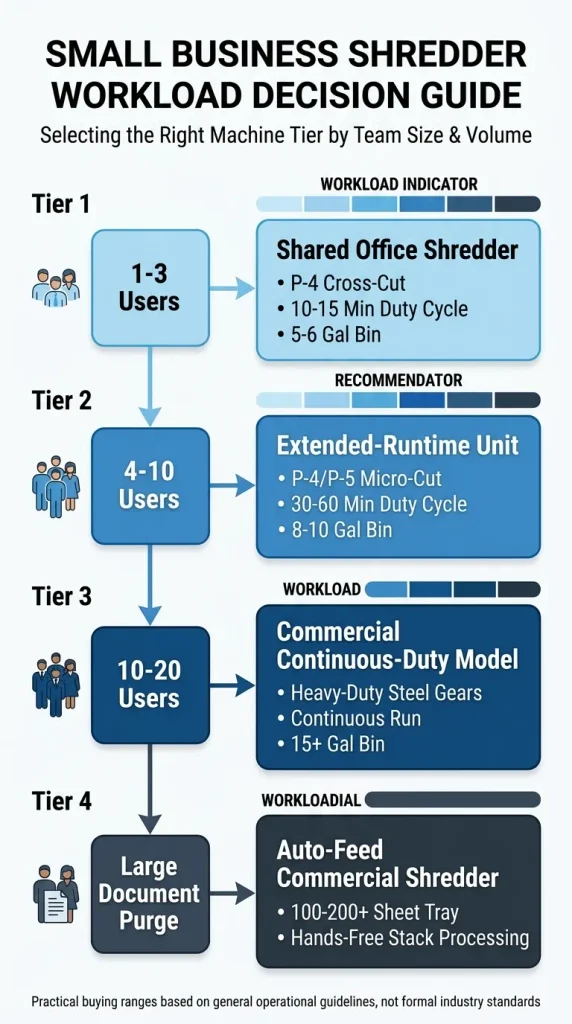
Use these as practical buying ranges, not industry rules.
1-3 Users: Light to Moderate Office Work
A 1-3 person office can often work well with a shared small-office shredder.
Look for:
- P-4 security for ordinary confidential records.
- At least 15 sheets per pass if manual feeding is your main workflow.
- Around 8 to 9 gallons of bin capacity.
- Around 30 minutes of stated runtime if shredding happens in sessions.
The Fellowes 99Ci fits this use case on its documented specifications.
4-10 Users: Regular Shared Workload
Once more employees share one machine, downtime becomes more expensive.
Look for:
- Longer runtime.
- Larger waste capacity.
- Better overload and jam handling.
- A workflow that does not require one employee to babysit every batch.
- Auto-feed if the office regularly accumulates stacks.
This is where the Aurora AU200MA, Bonsaii C283-A, and larger Fellowes machines start separating themselves from ordinary personal shredders.
10-20 Users: High-Volume Workflows
A 10-20 person business should not automatically buy an industrial machine. Start with the actual shredding volume.
If documents arrive continuously, a continuous-duty model can make more sense. If documents accumulate into periodic stacks, auto-feed may provide more useful automation.
For a larger shared office, the Fellowes 225Ci’s continuous operation and 16-gallon bin directly address that workflow.
1,000+ Sheets per Week: Consider Batch Automation
At 1,000 sheets per week, the question changes from “How many sheets can this shredder take?” to “How much employee time does shredding consume?”
A 200-sheet auto-feed machine can divide a 1,000-sheet workload into five nominal 200-sheet batches. That does not mean the machine will finish those batches at a fixed speed. Actual throughput depends on the machine, paper condition, feed mode, and operating conditions.
For large periodic purges, automatic feeding can reduce the amount of time an employee spends standing at the shredder.
P-4 vs. P-5 for Small Business
P-5 is not automatically the correct answer for every business.
When P-4 Makes Sense
P-4 can be a practical choice for many confidential business records, especially when the office needs a smaller particle size than strip-cut shredding without moving to P-5 equipment.
Financial paperwork, invoices, customer correspondence, internal documents, and many employee records can fall into this decision category. Your organization’s actual requirements should determine the security level.
When P-5 Makes Sense
P-5 produces smaller particles and can make sense when your document-security policy calls for a finer destruction level.
The Aurora AU200MA, for example, is specified at P-5 with 2 x 12 mm particles.
Why P-Level Does Not Equal Compliance
A shredder’s P-level does not make your organization HIPAA compliant, GDPR compliant, or compliant with every record-disposal requirement.
The FTC’s Disposal Rule requires covered businesses and individuals to take reasonable measures to protect consumer-report information during disposal. Shredding is one example of an appropriate disposal method, but the rule does not prescribe one shredder model or a universal P-level.
For a deeper security-level explanation, See our guide to understand shredder security ratings.
Compliance note: ShredProInk explains general document-destruction standards and product specifications. It does not certify your organization’s legal or regulatory compliance. Consult your compliance officer or counsel for requirements that apply to your records.
3-Year Total Cost of Ownership
Sticker price is only the first line of the business case.
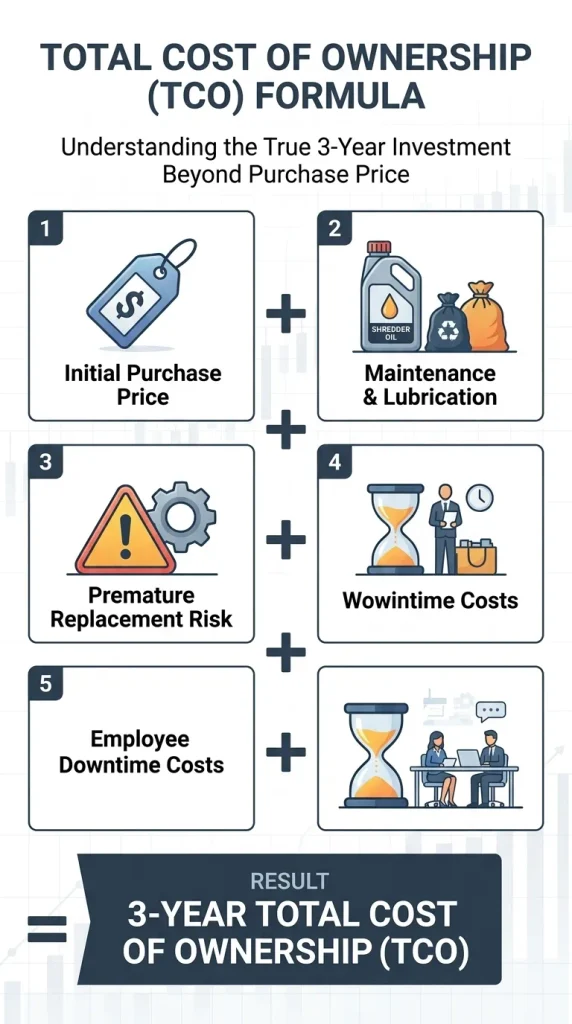
A useful shredder total cost of ownership calculation is:
3-Year TCO = Purchase price + maintenance/consumables + replacement cost + workflow/downtime cost
The final component needs care. Do not invent an employee wage or claim a specific dollar saving without evidence.
Instead:
Downtime cost = Unusable shredder hours × loaded employee cost × affected employees
Worked Case Study: 10-Person Accounting Office
This is a hypothetical planning example, not a ShredProInk customer case study.
Suppose 5 employees each spend 15 minutes waiting for or dealing with a shredder during a document purge.
5 employees × 0.25 hour = 1.25 employee-hours
If that happens once per week:
1.25 × 52 = 65 employee-hours per year
Over 3 years:
65 × 3 = 195 employee-hours
The point is not that every business will lose 195 hours. The point is that your office can put its own loaded labor cost into the formula.
If your loaded employee cost were hypothetically $30 per hour:
195 × $30 = $5,850
That $5,850 is a hypothetical workflow-cost figure, not a product saving claim.
This is why a $200 difference in purchase price can become less important when the machines have very different operating patterns.
Purchase Price
Record the actual Amazon price on the publication date.
Do not build a permanent TCO calculation around a price that will change.
Maintenance and Consumables
Include:
- Shredder oil or approved lubricant.
- Lubrication sheets where applicable.
- Replacement waste bags.
- Potential service costs.
Your ownership best practices hub covers the maintenance side in more detail.
Downtime and Employee Time
Track how often the machine:
- overheats,
- needs cooldown,
- jams,
- requires bin emptying,
- needs manual intervention,
- becomes unavailable during shared use.
This is where duty cycle becomes an economic specification.
Replacement Cost
A lower-priced shredder can still cost more if the business replaces it sooner.
Do not claim a specific service life unless the manufacturer provides a defensible figure. Instead, compare warranty coverage, cutter warranty, duty cycle, workload rating, and replacement availability.
What to Check Before Buying a Business Shredder
Use this procurement checklist before clicking the Amazon button.
Manufacturer Duty-Cycle Rating
Find the actual runtime and cooldown information.
Realistic Daily Workload
Estimate sheets per day and sheets per week. Separate normal workload from occasional document purges.
Warranty
Check both machine and cutter coverage. Warranty terms vary by manufacturer and model.
Bin Emptying
A larger bin can reduce interruptions in a shared office.
Replacement Parts and Maintenance
Check whether the manufacturer documents lubrication, troubleshooting, replacement parts, and service support.
Noise and Footprint
A 90-pound commercial machine may be a poor fit for a cramped office even if its workload rating looks attractive.
Manual vs. Auto-Feed
Choose manual feeding when employees regularly shred smaller batches. Choose auto-feed when the office often accumulates larger stacks that can be loaded and left to process.
For a more detailed selection framework, connect this section to SUPP-25: How to Choose a Shredder for Your Small Business.
Small Business Shredder Buyer’s Checklist
Before buying, write down these 10 numbers and requirements:
- Users: How many employees share the machine?
- Sheets per week: Estimate normal volume.
- Largest purge: Estimate your biggest occasional job.
- Security: P-4 or P-5 based on your document requirements.
- Feed method: Manual, auto-feed, or both.
- Minimum runtime: How long must the machine operate before stopping?
- Bin size: How often can employees reasonably empty it?
- Noise: Will it sit beside desks or meeting areas?
- Warranty: Compare machine and cutter coverage.
- 3-year TCO: Add purchase, maintenance, replacement, and workflow costs.
Which Heavy-Duty Shredder Should a Small Business Buy?
There is no single machine that fits every small business.
Choose the Aurora AU200MA when P-5 security and 200-sheet batch feeding are the main requirements. Choose the Bonsaii C283-A when you want a similar hands-free workflow with P-4 micro-cut security.
Choose the Fellowes Powershred 99Ci when 1 to 3 users will manually feed documents and a 30-minute work period is enough. Move up to the Fellowes Powershred 225Ci when continuous operation, a 16-gallon bin, and higher shared-office capacity matter more than compact size.
The Amazon Basics AU200XA belongs in the value comparison for businesses that want 200-sheet auto-feed and P-4 security, but verify the exact model before publication because Amazon Basics sells multiple 200-sheet configurations.
The buying decision should follow this order:
document volume → security requirement → workload → duty cycle → feed method → bin capacity → TCO → product
That is a better business case than choosing the shredder with the biggest sheet-count number.
Ready to Compare Prices?
Use the comparison above to narrow your shortlist, then check current Amazon pricing and availability for the models that fit your workload.
Frequently Asked Questions
What Is the Best Shredder for a Small Business?
The right choice depends on workload rather than employee count alone. A 1-3 person office may fit the Fellowes 99Ci, while a business handling large batches may benefit more from an auto-feed model or a continuous-duty machine.
What Makes a Paper Shredder Heavy-Duty?
A heavy-duty shredder combines higher workload capacity with features such as longer runtime, larger bins, higher sheet capacity, overload protection, and construction intended for frequent office use. Continuous-duty operation is a particularly useful distinction for high-volume offices.
How Many Sheets Should a Business Shredder Handle?
There is no universal number. For manual feeding, compare the rated sheets per pass with your actual document volume. For batch work, a 200-sheet auto-feed tray can be more useful than a higher manual sheet rating.
Is P-4 Enough for a Small Business?
P-4 can be suitable for many confidential business documents, but the correct security level depends on the sensitivity of the records and your organization’s requirements. Do not treat P-4 as an automatic compliance certification.
Is P-5 Better Than P-4?
P-5 produces smaller particles than P-4, so it provides a finer level of paper destruction. That does not mean every business needs P-5. Compare the document sensitivity and applicable requirements before paying for the higher security level.
How Long Should a Business Shredder Run?
It depends on the model. The Fellowes 99Ci is rated for 30 minutes on and 40 minutes off, while the Fellowes 225Ci is rated for continuous operation. The Aurora AU200MA and Bonsaii C283-A list up to 60 minutes in auto-feed operation.
Are Auto-Feed Shredders Worth It for an Office?
They can be worth it when employees regularly accumulate batches of documents. Auto-feed reduces the need for someone to stand at the feed slot, but manual feeding can be more practical for smaller jobs throughout the day.
How Long Do Commercial Shredders Last?
There is no reliable universal lifespan for every commercial shredder. Review the manufacturer’s warranty, cutter warranty, duty cycle, workload rating, maintenance requirements, and service support instead of relying on an assumed number of years.
How Much Does a Business Shredder Cost?
Prices vary widely by security level, capacity, automation, duty cycle, and commercial class. Treat the current purchase price as one part of the decision and compare it with maintenance, replacement risk, and employee time.
Can One Shredder Serve a 10-Person Office?
Yes, but the right model depends on how much paper those 10 employees generate for destruction. A low-volume 10-person office may not need a large commercial machine, while a high-volume office can benefit from continuous operation, larger bins, or auto-feed.
Author: Umer Hussain
Umer Hussain researches and writes ShredProInk’s paper shredder buying guides, cross-referencing manufacturer specifications, DIN 66399 security ratings, and verified buyer feedback to help readers match a shredder to their actual document-security needs. See our Editorial Methodology for how recommendations are built.