

Paper documents still carry information you don’t want sitting in an open trash can. Bank statements, pay stubs, medical paperwork, credit offers, receipts, and expired IDs can contain names, addresses, account details, or other personal information.
Document security at home starts with a simple rule: know what you need to keep, protect the documents you still need, and securely destroy the paperwork you no longer need.
A paper shredder handles one part of that process. It can reduce the exposure created when sensitive paper leaves your home, but it can’t stop phishing, stolen mail, data breaches, compromised accounts, or weak passwords.
This guide shows you how to build a practical home document-security routine, decide what belongs in the shred pile, understand shredder security levels, and match the machine to the sensitivity and volume of your paperwork.
Affiliate Disclosure: As an Amazon Associate, ShredProInk earns from qualifying purchases. We may earn a commission if you buy through our links, at no extra cost to you.
What Is Document Security at Home?
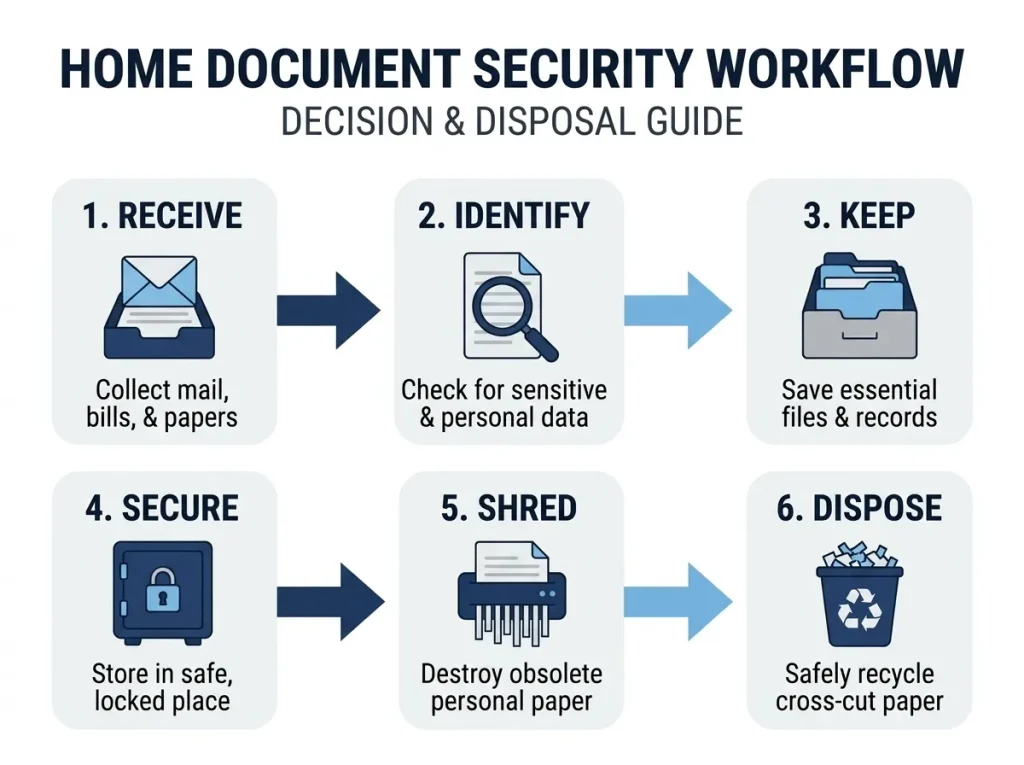
Document security at home means controlling sensitive paperwork throughout its lifecycle: receive, use, retain, store, destroy, and dispose.
The goal isn’t to shred every piece of paper that enters your house. The goal is to prevent personal information from remaining exposed after you no longer have a legitimate reason to keep it.
Why Paper Documents Still Matter
A paper document can contain several pieces of information that become more sensitive when combined.
A bank statement might show your name, address, account information, and transaction history. A pay stub can contain employment and income information. A medical document may contain health information and identifying details.
The FTC recommends keeping financial records and documents containing personal information in a safe place. When you no longer need those documents, the agency recommends shredding them before throwing them away.
That makes secure paper disposal a straightforward part of identity theft prevention at home.
What Counts as Sensitive Personal Information?
Sensitive information can include:
- Social Security information and other government identifiers
- Bank and financial account details
- Credit-card information
- Medical and insurance information
- Income and employment records
- Addresses and contact information
- Credit reports and credit applications
- Information that could help someone impersonate you
The sensitivity of a document depends on what it reveals and what someone could do with that information.
A piece of paper with only a generic advertisement doesn’t need the same treatment as a document containing an account number.
Where Household Document Security Fits Into Identity Theft Prevention
Think of document security as the physical side of a larger privacy system.
Your online accounts need passwords and multifactor authentication. Your credit files can be protected with tools such as a security freeze. Your mail needs attention. Your paper records need controlled storage and secure disposal.
The FTC recommends several of these measures together rather than treating shredding as a complete identity-protection system.
Can a Paper Shredder Prevent Identity Theft?
No. A paper shredder cannot guarantee that you won’t experience identity theft.
What it can do is reduce one physical source of exposure: sensitive information left behind in documents you throw away.
The FTC specifically advises consumers to shred documents containing personal or financial information before disposal.
What Shredding Actually Protects Against
Secure document disposal reduces the chance that sensitive paper will remain readable after it leaves your possession.
That matters for documents such as:
- Bank statements
- Credit-card statements
- Credit offers
- Pay stubs
- Medical paperwork
- Credit reports
- ATM receipts
- Expired identification
- Documents containing account information
The important distinction is simple:
Shredding protects discarded paper. It does not protect every source of personal information.
What Shredding Cannot Protect Against
A shredder cannot prevent:
- Data stolen in a company breach
- Phishing attacks
- Compromised online accounts
- Stolen passwords
- Fraudulent calls or messages
- Mail stolen before you retrieve it
- Personal information already exposed elsewhere
That is why a shredder should be treated as one physical control within a broader identity-protection routine.
Why Secure Document Disposal Is Only One Part of Identity Protection
The FTC recommends protecting documents, monitoring financial activity, guarding your Social Security number, using strong passwords, and adding multifactor authentication where available.
The practical takeaway is not “buy the most secure shredder.”
It’s:
Identify the information you need to protect, reduce unnecessary exposure, and use the right control for each risk.
What Documents Should You Shred at Home?
A useful way to decide what to shred is to ask two questions:
- Does this document contain information I wouldn’t want exposed?
- Do I still have a reason to keep the original paper?
If the answer is yes and no, respectively, secure destruction may be appropriate.
The FTC’s current consumer guidance separates documents that should be kept from documents that can be shredded.
| Document | Shred? | When or Condition | Why |
|---|---|---|---|
| Bank statements | Yes | After the retention need ends | Financial information |
| Credit-card statements | Yes | After no longer needed | Account information |
| ATM receipts | Usually | After records are no longer needed | Transaction information |
| Credit offers | Yes | When no longer needed | Personal and credit information |
| Expired IDs | Yes | Once expired and no longer required | Identity information |
| Medical paperwork | Yes | Once no longer needed | Health information |
| Pay stubs | Yes | After the retention need ends | Income and employment information |
| Tax records | Depends | After applicable retention requirements end | Tax and financial information |
| Utility bills | Yes | Once no longer needed | Name, address, and account information |
| Credit reports | Yes | Once no longer needed | Sensitive credit information |
| Cleared checks | Yes | When no longer needed | Banking information |
| Sensitive junk mail | Yes | Before disposal | Personal information |
The timing matters. Don’t shred a document simply because it contains sensitive information if you still need the original.
Shred Financial Documents After You No Longer Need Them
Financial documents deserve particular attention because they can combine identity and account information.
The FTC specifically lists bank statements, credit-card and utility bills, pay stubs, and certain other financial records among documents consumers should keep for a period and then consider shredding when paper copies are no longer needed.
For tax records, don’t use a blanket “shred after X years” rule. The IRS says record-retention periods depend on the type of record and circumstances. Its general guidance says many tax records should be kept for at least three years, with longer periods applying in some situations.
For a deeper retention decision, see our tax document retention guide and our keep-or-destroy framework.
Don’t Forget Small Pieces of Paper
A common mistake is to focus on full-page documents and ignore receipts or small slips.
An ATM receipt may contain transaction information. A credit offer may contain enough personal information to deserve secure disposal. A prescription document can contain private information too.
The FTC specifically lists ATM receipts, credit offers, credit reports, prescription information, expired warranties, and expired forms of identification among documents to shred.
What Documents Should You Keep Instead of Shredding?
Good document security requires knowing when not to shred.
Some documents have long-term value or may be difficult to replace. Others support tax, property, legal, financial, or family records.
Documents to Keep Securely
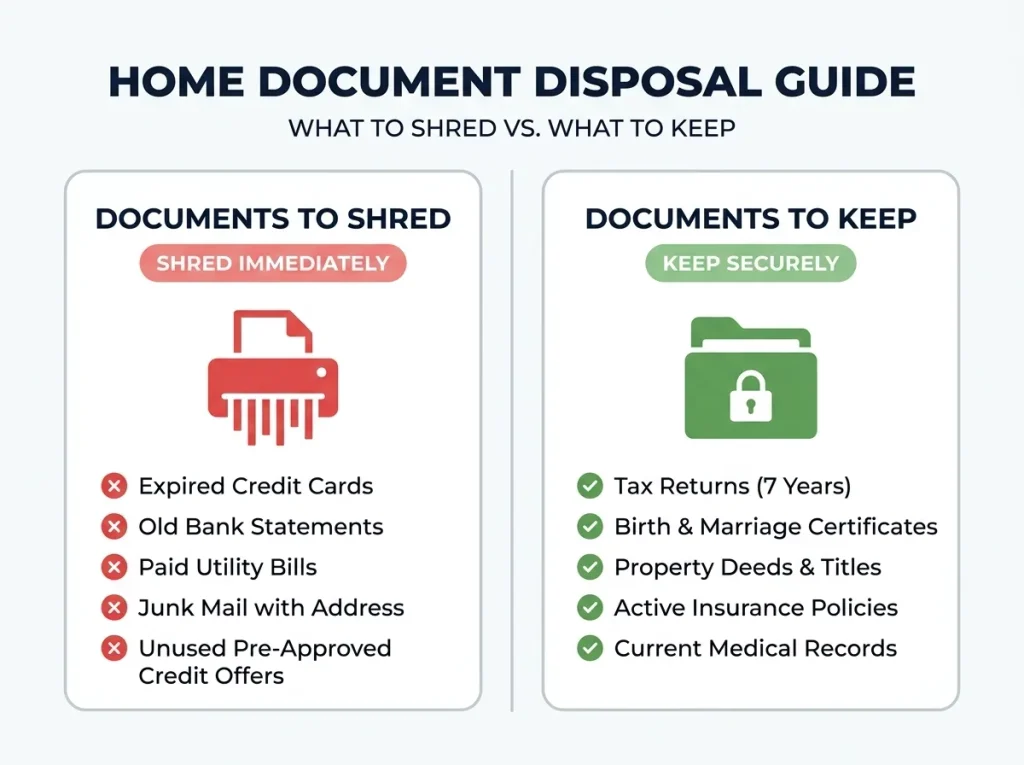
Examples include:
- Birth certificates or adoption papers
- Social Security cards
- Valid passports
- Citizenship or residency documents
- Marriage and divorce records
- Military records
- Wills and living wills
- Powers of attorney
- Property deeds and titles
- Vehicle titles
- Important health records
- Certain pension and retirement documents
The FTC’s current guidance places many of these records in its “keep forever” or “keep while you own” categories.
Store these records securely rather than feeding them into a shredder.
Why Retention Rules Matter
Retention isn’t simply a security question.
A document can contain sensitive information and still need to be preserved because it supports a tax return, proves ownership, establishes a legal right, or may be required by another organization.
The IRS specifically warns that tax records may need to be retained longer than its general periods in certain circumstances. It also advises checking other requirements before discarding records that are no longer needed for tax purposes.
When in Doubt, Verify Before Destroying
Don’t let a shredder turn into a shortcut for document management.
If you’re unsure whether a record has legal, tax, insurance, property, or financial value, verify the retention requirement first.
For a deeper look at this decision, see our guide to when to shred versus keep documents.
How to Build a Secure Document Disposal Routine at Home
The best home document-security system is one you can repeat without thinking about it.
Use this simple seven-step routine.
Step 1: Create a Shred Pile
Keep a temporary location for paperwork that has been identified for destruction.
Don’t put sensitive documents straight into the normal trash while you’re sorting.
Step 2: Separate Documents That Must Be Retained
Before shredding, check whether each document still has a tax, legal, property, insurance, or financial purpose.
Move anything that needs to stay into its secure storage location.
Step 3: Remove Obvious Non-Paper Items
Separate materials that your shredder isn’t rated to handle.
Don’t assume a machine can process every envelope insert, laminated card, adhesive label, plastic sleeve, or other material.
Check the manufacturer’s specifications before feeding anything beyond ordinary paper.
Step 4: Match the Shredder to the Sensitivity
The security level should reflect the type of information you’re destroying.
A generic piece of junk mail doesn’t require the same destruction standard as a document containing highly sensitive personal information.
Step 5: Shred in Manageable Batches
Don’t confuse sheet capacity with duty cycle.
Sheet capacity tells you how many sheets the machine can process in a pass. Duty cycle describes how long the shredder can operate before it needs a cooling period.
If you’re clearing several years of paperwork, duty cycle can matter more than a large sheet-capacity number.
Step 6: Empty and Contain the Shredded Material
Once sensitive documents have been destroyed, don’t undo the security benefit by leaving loose fragments exposed.
Keep shredded material contained while you prepare it for its final disposal method.
Step 7: Recycle or Dispose of It Appropriately
Local recycling rules vary, and some recycling programs treat shredded paper differently from ordinary paper.
Follow the requirements for your local collection service. For the detailed disposal side, see our guide to shredded paper recycling and disposal.
How We Research Document-Security Recommendations
We compare manufacturer specifications, review documented DIN 66399 security classifications, cross-reference authoritative consumer guidance, and review independent product information and verified-purchase feedback where available. We don’t claim hands-on testing unless we actually performed it.
What Shredder Security Level Do You Need at Home?
This is where document security becomes a shredder-selection question.
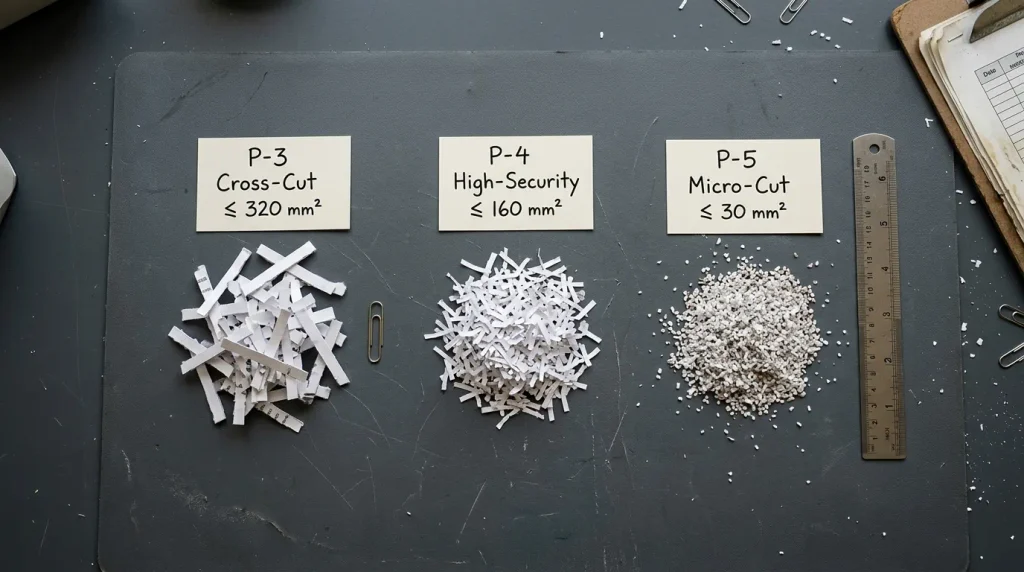
DIN 66399 is a standard used to classify security levels for data destruction. For paper, the levels are identified as P-1 through P-7, with higher P-levels corresponding to smaller particle sizes.
You don’t need to memorize all seven levels to make a sensible household decision.
What DIN 66399 and P-Levels Mean
The basic relationship is:
Higher P-level → smaller paper particles → greater destruction security.
For paper shredders, manufacturers commonly map strip-cut machines to lower P-levels, cross-cut machines to P-3 or P-4, and micro-cut machines to higher levels such as P-5. Exact classifications depend on the shredder’s documented particle size, so check the manufacturer’s specification rather than judging security by the marketing name alone.
For the complete technical explanation, see our guide to DIN 66399 and shredder security ratings.
P-3 vs. P-4 vs. P-5 for Household Documents
For general household decision-making, the distinction can be framed like this:
| Document sensitivity | General direction | Why |
|---|---|---|
| Low-risk, non-sensitive paper | Lower security may be enough | Limited personal information |
| General personal information | P-3 or higher may be appropriate | Smaller particles reduce exposure |
| Financial and confidential records | P-4 or higher is commonly considered | Greater destruction security |
| Highly sensitive information | Consider P-5 or higher | Smaller particles provide greater destruction security |
These are decision guidelines, not universal legal requirements.
Fellowes, for example, describes P-3 and P-4 cross-cut shredding as suitable for sensitive personal or confidential information and P-5 micro-cut shredding as suitable for highly confidential information. That’s a manufacturer recommendation, not a government rule that every household must follow.
If you’re shredding financial statements, credit information and other sensitive household records, look for a model whose documented security level matches the sensitivity of your paperwork.
Why Particle Size Matters
A shredder doesn’t make information disappear. It breaks the document into smaller pieces.
Smaller pieces generally make reconstruction more difficult. That’s why security standards focus heavily on particle size.
The useful question isn’t “Which marketing label sounds safest?”
Ask:
What information am I destroying, and what documented particle size does this machine produce?
Does Every Home Need a Micro-Cut Shredder?
No.
A micro-cut shredder can make sense when you regularly destroy highly sensitive information and want smaller particles. But that doesn’t mean every household needs the highest available security level.
Micro-cut machines can bring trade-offs in areas such as speed, capacity, runtime, noise, and price depending on the model.
If your main paperwork consists of ordinary household documents, compare the actual security requirement with the machine’s documented specifications.
For the narrower question of whether P-3 is sufficient for household use, see our home P-3 security guide.
Cross-Cut vs. Micro-Cut for Home Document Security
Cross-cut and micro-cut shredders both cut paper across its length and width, but they produce different particle sizes.
Cross-Cut
Cross-cut shredders produce smaller pieces than traditional strip-cut machines.
Depending on the documented particle size, cross-cut models can fall into P-3 or P-4 categories. They can be a practical fit for household and home-office documents that contain personal or confidential information.
Micro-Cut
Micro-cut shredders produce smaller particles than typical cross-cut machines.
P-5 micro-cut models are commonly positioned for highly confidential information. The smaller output can provide more destruction security, although the right choice still depends on the information being destroyed and the machine’s actual specification.
When Paying More for Smaller Particles Makes Sense
A higher security level makes more sense when:
- You regularly destroy highly sensitive records.
- You handle confidential client information.
- You want a smaller particle size for additional destruction security.
- Your workflow justifies the additional cost and capacity trade-offs.
It makes less sense to pay for a security level you rarely need simply because the product description sounds safer.
For the full comparison, see how the three shredder cut types compare.
Shredder Features That Actually Matter for Document Security
Particle size gets most of the attention, but the machine still has to work safely and consistently enough to support your document-security routine.
Safety Lock
A safety lock can help prevent unintended operation.
This matters particularly in homes where children or pets may be near the machine.
Overheat Protection
Shredders generate heat during operation.
Overheat protection can help prevent damage when the machine reaches its thermal limit. It also reinforces why you should respect the manufacturer’s stated duty cycle rather than treating the machine as a continuous-use device.
Auto-Reverse and Jam Handling
Paper jams can interrupt a shredding session and encourage people to pull documents out or bypass normal operating procedures.
Auto-reverse can help clear certain feed problems by reversing the cutters. Check the manufacturer’s documented feature description rather than assuming an “anti-jam” label means a machine cannot jam.
Bin Capacity
A larger bin can reduce how often you stop to empty the shredder.
That matters during a large document purge, but it shouldn’t override security, duty cycle, and particle-size requirements.
Runtime and Duty Cycle
Duty cycle becomes important when you’re shredding large batches.
A shredder that handles 12 sheets at a time may still be a poor choice for a filing-cabinet cleanup if it requires frequent cooling periods.
Noise Level for Home Offices
Noise matters when the shredder sits near your desk, phone calls, or shared living space.
For a home-office user, a quieter machine can make regular document disposal easier to maintain.
Credit Cards and Other Media
Some shredders are rated to destroy credit cards and other media.
Don’t assume a paper shredder can process these materials. Check the exact manufacturer’s specification before feeding anything other than paper.
How Much Shredder Capacity Does a Home Need?
The right capacity depends on how you generate documents, not just how many people live in your house.
Occasional Household Shredding
If you shred a few pieces of mail every week, you may not need a large machine.
Security level, basic safety features, bin size, and ease of use may matter more.
Home Office Paperwork
A home-office professional may shred paperwork every day.
In that case, look more closely at:
- Security level
- Noise
- Runtime
- Duty cycle
- Sheet capacity
- Bin capacity
- Footprint
The audience research for ShredPro Ink identifies this group as particularly sensitive to workflow fit, noise, and runtime rather than raw specifications.
Tax-Season Document Purges
Tax-season shredding is a different workload.
You may accumulate months or years of paperwork and then try to process it in a short period.
For this use case, duty cycle and cooling requirements can matter more than the maximum sheet count printed on the box.
For document-specific options, see our tax-season shredder recommendations.
Large Filing-Cabinet Cleanouts
A large backlog can expose a weakness in an otherwise adequate household shredder.
Before buying, estimate the number of pages you need to destroy and compare that workload with the machine’s documented runtime and cooling requirements.
If the volume is unusually large, a professional document-destruction service may be more practical.
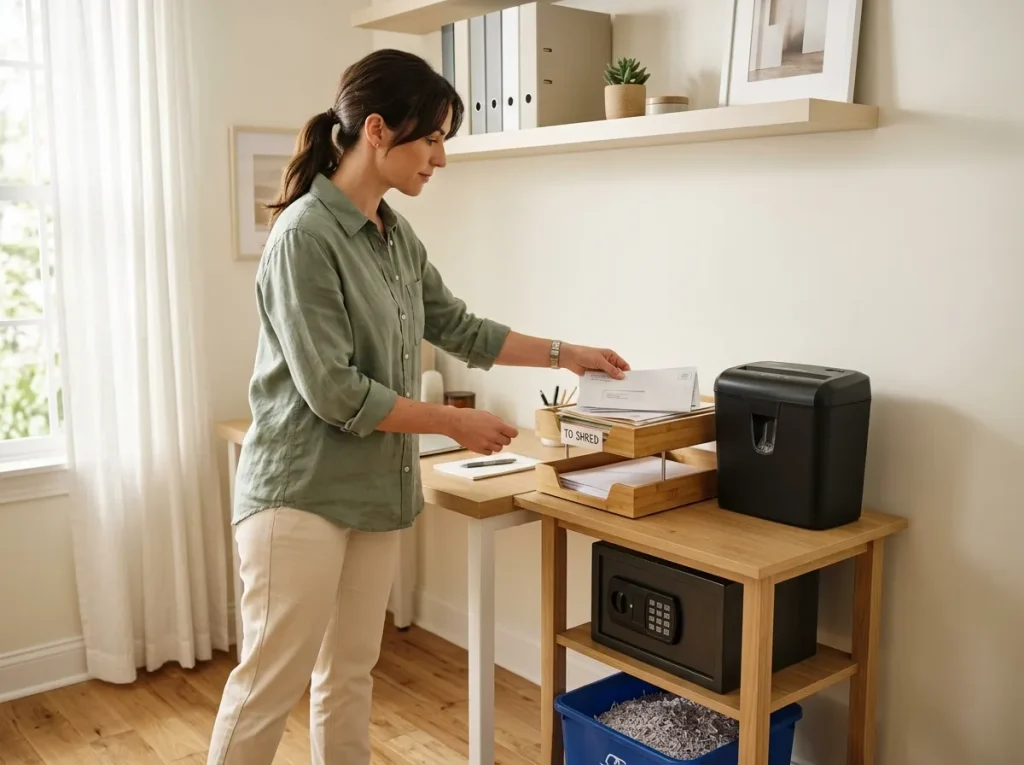
Create a Home Document Security Zone
A shredder works better when you build a routine around it.
Think of a home document security zone as one place where sensitive paperwork moves through the final stages of its lifecycle.
Keep Sensitive Paper Away From Normal Trash
Don’t let documents marked for destruction sit loose in the same wastebasket used for ordinary household trash.
Use a dedicated temporary container while you’re waiting to shred.
Store Documents Awaiting Destruction Securely
If you only shred once a week, keep the waiting pile somewhere other people cannot casually access.
The point is simple: a document shouldn’t be secure on Monday and exposed in an open recycling bin by Friday.
Position the Shredder Near the Paper Accumulation Point
If the machine is buried in a closet, you’re less likely to use it.
Place it near the desk, mail station, filing area, or home office where sensitive paper actually accumulates.
Keep Children and Pets Away From the Feed Opening
A shredder contains moving cutting components.
Use the safety controls provided by the manufacturer and position the machine where children and pets cannot access the feed opening.
Don’t Leave Sensitive Papers in Open Recycling
Recycling isn’t the same as secure destruction.
If a document contains information you no longer need, destroy it before placing the resulting material into the appropriate disposal stream.
Other Ways to Reduce Identity Theft Risk at Home
A paper shredder addresses paper.
Identity theft prevention covers much more.
Secure Your Social Security Number
Don’t give your Social Security number simply because someone asks for it.
The FTC recommends asking why it is needed, how it will be protected, whether another identifier can be used, and whether only the last four digits are sufficient.
Protect Incoming and Outgoing Mail
Retrieve mail containing personal or financial information promptly.
The FTC specifically advises taking mail containing personal information out of your mailbox as soon as possible.
Review Bank and Credit-Card Statements
Regular statement review can help you spot transactions or charges you don’t recognize.
Shredding protects the paper copy. Reviewing the account helps you notice suspicious activity.
Use Strong Passwords and Multifactor Authentication
Your digital accounts can contain far more personal information than a single paper document.
The FTC recommends strong passwords and two-factor or multifactor authentication for accounts that offer it.
Consider a Credit Freeze When Appropriate
A security freeze restricts access to your credit report and can help prevent new credit accounts from being opened in your name. USA.gov says consumers can place or lift a freeze for free through each of the three major credit reporting agencies.
A freeze is a credit-protection tool. It isn’t a replacement for secure document disposal.
Protect Sensitive Digital Files
Paper security doesn’t help if the same information sits unprotected on your computer or phone.
Use current software, strong account security, multifactor authentication, and sensible access controls for digital records.
When a Home Shredder Is Not Enough
A household shredder isn’t automatically the right answer for every destruction job.
Very Large Document Volumes
A major office cleanout may exceed the practical duty cycle of a consumer machine.
Running a small shredder through thousands of pages can take considerable time and may require repeated cooling periods.
Business Records Requiring Controlled Destruction
Businesses may have additional obligations based on the type of information they handle, the industry they operate in, and their internal policies.
Don’t assume that a particular P-level alone makes an organization compliant.
Documents Requiring Documented Destruction Processes
Some organizations may need records of how documents were destroyed.
A household shredder doesn’t automatically provide that kind of chain of custody or documentation.
For healthcare, legal, and other regulated environments, use the applicable regulation and your organization’s compliance process rather than relying on a generic shredder claim.
Disclaimer: This page provides general information about document destruction and security. It does not certify that a particular shredder or shredding process satisfies HIPAA, GDPR, FACTA, IRS, or another legal or regulatory requirement. Organizations should verify their specific obligations with the applicable regulation, compliance officer, or qualified counsel.
Community Shredding Events
A local shred day can make sense when you have a backlog but don’t want to purchase a larger machine.
The FTC itself suggests looking for a local shred day if you don’t have a shredder.
Professional Document-Destruction Services
Professional destruction can be practical for large volumes or organizations with formal destruction procedures.
The right choice depends on volume, sensitivity, required documentation, and cost.
How to Dispose of Shredded Paper Securely
Shredding is the destruction step. Disposal is the final step.
Can Shredded Paper Be Recycled?
Often, yes, but local recycling programs don’t all handle shredded paper the same way.
Some programs ask residents to contain shredded paper in a paper bag or another specified container. Others don’t accept it through curbside collection.
Check your local recycling provider before assuming loose shredded paper belongs in the normal recycling bin.
For the dedicated disposal guidance, see our shredded paper recycling guide.
Don’t Leave Loose Sensitive Fragments Exposed
Once paper has been shredded, keep the fragments contained until final disposal.
The goal is to maintain control of the material throughout the complete process.
Follow Local Recycling Requirements
The safest approach is simple:
Shred → contain → check local rules → dispose.
Don’t guess about local recycling requirements.
A Simple Home Document Security Checklist
You don’t need a complicated security system to manage household paperwork.
Use this schedule as a practical starting point.
Monthly
- Review accumulated paperwork.
- Separate records that still need to be kept.
- Shred documents that no longer have a retention purpose.
- Empty and secure the shredder contents.
- Review bank and credit-card statements.
- Remove unnecessary sensitive mail and paperwork.
Quarterly
- Review filing cabinets.
- Check older financial paperwork.
- Review whether stored records still have a legitimate purpose.
- Clean up sensitive digital files.
- Check your shredder for obvious maintenance needs.
Annually
- Review tax-related paperwork against current retention guidance.
- Check expired IDs and cards.
- Review credit reports.
- Clear accumulated sensitive paper.
- Review important documents that should remain securely stored.
- Reassess whether your shredder still fits your workload.
The IRS recommends reviewing retention requirements based on the type and circumstances of the record rather than applying one universal retention period.
Frequently Asked Questions
Can shredding prevent identity theft?
No. Shredding cannot guarantee protection from identity theft. It can reduce exposure from discarded paper containing personal or financial information, which is why the FTC recommends shredding sensitive documents before disposal.
What documents should I shred at home?
Shred documents that contain personal or financial information once you no longer need them and have confirmed that no retention requirement applies. Common examples include ATM receipts, credit offers, credit reports, expired IDs, and certain financial records.
Should I shred bank statements?
Yes, once you no longer need the paper copy and any applicable retention requirement has ended. The FTC includes bank statements among documents consumers should retain for a period before considering shredding paper copies.
Should I shred credit-card offers?
Yes. Credit offers can contain personal and credit-related information, and the FTC specifically lists offers of credit or insurance among documents to shred.
Should I shred old tax documents?
Eventually, but don’t use a blanket rule. The IRS says retention depends on the type of record and circumstances. Its general guidance covers a three-year period for many records, with longer periods applying in certain situations.
For the decision process, see our tax document retention guide.
Is cross-cut enough for home use?
Cross-cut can be suitable for many household documents, but the answer depends on the shredder’s documented security level and the sensitivity of the paperwork. Cross-cut models can fall into P-3 or P-4 categories, so check the actual DIN classification rather than relying on the term “cross-cut” alone.
Do I need a micro-cut shredder at home?
Not necessarily. Micro-cut shredders produce smaller particles and can make sense for highly sensitive paperwork, but every household doesn’t need the highest security level. Match the documented particle size and security level to the information you’re destroying.
What P-level should I use for personal documents?
There isn’t one universal household P-level requirement. P-3 and P-4 can cover many personal and confidential document scenarios, while P-5 provides smaller particles for highly confidential information. The correct choice depends on sensitivity, risk, and the machine’s documented DIN classification.
Can shredded documents be reconstructed?
Shredded paper isn’t magically unrecoverable. Smaller particles generally make reconstruction more difficult, which is one reason higher DIN P-levels use smaller particle sizes. The practical goal is to make discarded information substantially harder to recover and read.
Should I shred documents before recycling them?
If a document contains sensitive personal or financial information and you no longer need it, secure destruction should happen before ordinary disposal. Whether the resulting shredded paper can enter your recycling stream depends on local program rules.
What documents should never be shredded?
Don’t shred documents simply because they contain sensitive information. Important records such as birth certificates, valid passports, Social Security cards, property records, wills, powers of attorney, and certain health or retirement documents may need long-term secure storage.
Is a paper shredder enough to prevent identity theft?
No. A shredder protects one part of the physical document lifecycle. Identity protection also involves securing your Social Security number, protecting mail, reviewing financial activity, using strong passwords, enabling multifactor authentication, and considering tools such as a credit freeze when appropriate.
Your Home Document Security System Starts With the Information, Not the Shredder
Good document security at home isn’t about buying the highest-rated shredder and feeding every piece of paper into it.
It starts with classification.
Identify what information a document contains.
Retain what you still need.
Secure records that must stay.
Destroy documents that no longer have a legitimate purpose.
Match the shredder’s security level to the sensitivity.
Dispose of the shredded material appropriately.
Monitor the other parts of your identity and financial security.
That approach gives you a better answer than “buy a micro-cut shredder.”
If you’re ready to choose a machine, move from the security requirement to the product decision with our complete paper shredder buying methodology.
If you already know the security level and use case you need, compare our recommended paper shredders.
Author Bio
Author: William Dahlberg
William Dahlberg researches and writes ShredPro Ink’s paper shredder guides, cross-referencing manufacturer specifications, DIN 66399 security ratings, and verified buyer feedback to help readers match a shredder to their actual document-security needs. See our Editorial Methodology for how recommendations are built.